Restore Old Photos Online Free
Free AI photo restoration repairs damaged, faded, and scratched vintage photos instantly. Restore old family photos, fix torn pictures, and bring memories back to life. No signup required.
Restore Photo FreeRestore Your Old Photo
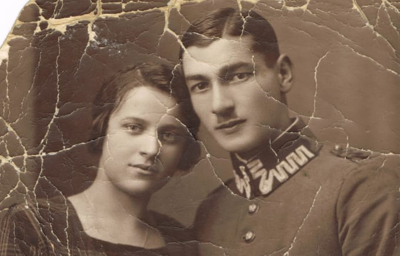
Upload your damaged, faded, or scratched old photo. Our AI photo restoration tool automatically repairs damage, enhances details, and restores your vintage memories.

Do you want to colorize black and white photos?
Transform your vintage photos with AI-powered colorization
Trusted by Families Worldwide
Our AI photo restoration tool is used by families, historians, and archivists to restore old photos and preserve precious memories.
50,000+
Users Monthly
200,000+
Photos Restored
Powered by custom-trained AI restoration technology
What is Photo Restoration?
Photo restoration is the process of repairing and enhancing damaged, aged, or deteriorated photographs to restore them to their original quality or improve their appearance. Old photo restoration involves correcting various types of damage including scratches, tears, fading, discoloration, water damage, and missing portions of the image.
Traditional photo restoration required skilled manual work by professional photographers and artists, often taking hours per image. Modern AI photo restoration uses deep learning to automatically detect and repair these imperfections in seconds while preserving the original character and authenticity of vintage photographs.
Our free tool lets you restore old photos online without needing Photoshop skills, professional services, or expensive software. Simply upload your damaged photo and let AI handle the restoration work.
Try Photo Restoration FreeHow it works
How to Restore Old Photos
Restoring old photos used to require professional photo restoration services or advanced Photoshop skills. With AI photo restoration, anyone can restore old photos online free in seconds. Here's how to restore old photos with our tool:
Upload your old photo
Upload the damaged, faded, or scratched photo you want to restore. Our AI photo restoration tool accepts JPG, PNG, and WebP formats up to 10MB. Scan physical photos at 300 DPI or higher for best restoration results.
Choose restoration settings
Select Standard for balanced results or Enhanced for superior restoration quality. Choose scale factor (1x, 2x, or 4x) to also increase resolution while restoring. Higher settings work best for heavily damaged photos.
AI restoration processing
Our AI analyzes your old photo and automatically repairs damage - fixing scratches, restoring faded colors, filling tears, and enhancing details. The AI intelligently reconstructs damaged areas while preserving original character.
Download your restored photo
Preview the before and after comparison to see the restoration results. Download your restored photo in high quality with no watermarks. Print, share, or archive your beautifully restored memories.
Types of Photo Damage We Can Restore
Our AI photo restoration tool can repair many types of damage to old photos. Whether your vintage photos have physical damage, aging effects, or quality issues, our old photo restoration technology can help.
Physical Damage
Scratches
Surface scratches and marks
Tears and Rips
Torn edges and splits
Creases and Folds
Bent and folded areas
Missing Pieces
Lost corners and sections
Aging and Environmental Damage
Fading
Washed out colors
Yellowing
Age discoloration
Water Damage
Stains and warping
Mold Spots
Fungal damage marks
Quality Issues
Blur
Out of focus areas
Low Resolution
Small or pixelated
Noise and Grain
Film grain and artifacts
Poor Exposure
Too dark or light
Color Problems
Color Shift
Unnatural color cast
Sepia Tone
Brown aging tint
Bleaching
Sun-faded areas
Staining
Discolored patches
Why Use Our Free AI Photo Restoration?
Restore Old Photos Online Free
Our photo restoration tool is completely free with no hidden costs. Professional restoration services charge $25-$100+ per photo. We let you restore old photos online free with unlimited use and no payment required.
No Signup Required
Start restoring photos immediately. No account creation, no email verification, no barriers. Just upload your damaged photo and get instant AI restoration results.
Better Than Photo Restoration Software
Our AI handles restoration automatically - no Photoshop skills needed. Photo restoration software requires manual work and expertise. Our AI does the hard work for you in seconds.
Fast Processing
Restore photos in 5-15 seconds. Professional photo restoration services take days or weeks. Our AI delivers instant results so you can restore multiple photos quickly.
High-Quality Results
Our custom-trained AI produces professional-quality restoration. Download restored photos in high resolution with no watermarks - ready for printing and sharing.
Works on Any Device
Restore old photos online from any device - Windows, Mac, iPhone, Android, tablet. No software installation needed. Works entirely in your browser.
Where Can I Restore Old Photos?
There are several options for restoring old photos, each with different tradeoffs in cost, time, and quality. Here's how our free AI photo restoration compares:
Who Uses AI Photo Restoration?
Families Preserving Memories
Restore old photos of grandparents, parents, and ancestors. Bring damaged family photos back to life for reunions, anniversaries, and heritage projects.
Genealogy Researchers
Enhance historical family photos for research and family trees. Restore old photos to create comprehensive family history archives.
Historians and Archivists
Restore historical photographs for research, exhibitions, and preservation. Make damaged historical images accessible and viewable again.
Photo Album Creators
Restore old photos for scrapbooks, photo books, and memorial projects. Get print-ready quality from damaged originals.
Gift Makers
Restore old photos for personalized gifts - restored prints for grandparents, memorial collages, and anniversary presents.
Estate Organizers
Restore and digitize old photos when organizing estates. Preserve family photo collections for future generations.
Tips for Best Photo Restoration Results
Scan at High Resolution
For physical old photos, scan at 300 DPI or higher. Higher resolution scans give the AI more detail to work with, resulting in better restoration quality. Avoid phone photos of photos when possible.
Keep the Original Clean
Gently clean dust from old photos before scanning. Use a soft brush or compressed air. Don't use water or cleaning solutions on vintage photos as this can cause additional damage.
Use Enhanced Mode for Heavy Damage
For severely damaged photos with major tears, missing pieces, or heavy scratching, select Enhanced quality mode. It takes slightly longer but produces better results for difficult restorations.
Combine with Colorization
After restoration, use our AI colorize photo tool to add color to black and white photos. Restore first, then colorize for best results.
Join Families Using AI Free Forever
See what users are saying about our photo restoration tool and other free AI image tools.
Photo Restoration FAQ
What is photo restoration?
Photo restoration is the process of repairing and enhancing damaged, aged, or deteriorated photographs. Old photo restoration involves fixing scratches, tears, fading, discoloration, water damage, and other imperfections to restore photos to their original quality or better.
Can I restore old photos online free?
Yes, our AI photo restoration tool lets you restore old photos online completely free with no signup required. Upload your damaged photo and get instant restoration with no watermarks, no payment, and unlimited use.
How to restore old photos?
To restore old photos: 1) Upload your damaged photo to our AI tool, 2) Select your restoration settings, 3) Wait seconds for AI processing, 4) Download your restored photo. The AI automatically fixes scratches, fading, tears, and other damage.
Can AI restore old photos?
Yes, AI can restore old photos remarkably well. Modern AI photo restoration uses deep learning trained on millions of images to detect and repair damage, enhance details, restore colors, and reconstruct missing areas while preserving the original character of vintage photographs.
Where can I restore old photos?
You can restore old photos using our free online AI photo restoration tool right here. Simply upload your photo, and our AI automatically repairs damage and enhances quality. No software download needed - it works in your browser on any device.
Where can I get an old photo restored?
Options include professional photo restoration services ($25-$100+), Photoshop (requires skills), photo restoration software, or our free AI tool. Our AI photo restoration provides professional-quality results instantly at no cost.
Which AI can restore old photos?
Our AI photo restoration tool uses custom-trained deep learning models specifically designed for old photo restoration. It excels at repairing scratches, restoring faded colors, fixing tears, and enhancing vintage photographs while maintaining authenticity.
How to restore old photos using AI free?
To restore old photos using AI free, upload your damaged photo to our tool, select quality settings, and click restore. Our AI processes the image in seconds and provides a downloadable restored version - completely free with no signup.
How to restore old photos in Photoshop?
Restoring old photos in Photoshop requires manual work using clone stamp, healing brush, and color correction tools. It takes hours of skilled work per photo. Our AI provides similar results automatically in seconds - no Photoshop subscription or skills needed.
What file formats are supported?
Our photo restoration tool supports JPG, PNG, and WebP image formats up to 10MB. Most scanned photos and digital images work perfectly. For best results, scan physical photos at 300 DPI or higher before uploading.
Ready to Restore Your Old Photos?
Bring your damaged, faded, and scratched photos back to life with our free AI photo restoration. No signup, no payment, unlimited use.
Restore Photo Free