AI Image Upscaler Free
Upscale images online without losing quality using our free AI image upscaler. Enhance resolution 2x or 4x with advanced AI technology. No Photoshop needed, no signup required.
Upscale Image NowUpscale Your Image
Upload your image, select your scale factor (2x or 4x), and let our AI image upscaler enhance your resolution without losing quality.
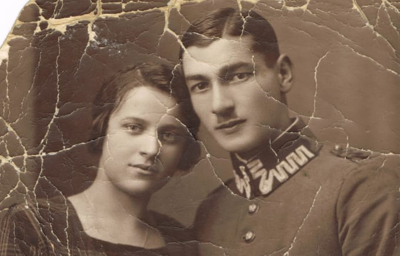
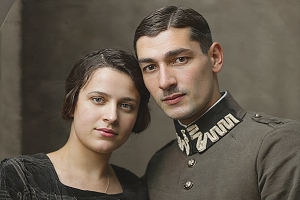
Do you want to colorize black and white photos?
Transform your vintage photos with AI-powered colorization
Trusted by Thousands
AFF AI Image Upscaler is used by photographers, designers, and creators worldwide to upscale images without losing quality.
40,000+
Users Monthly
200,000+
Images Upscaled
Powered by advanced AI upscaling technology
What is an AI Image Upscaler?
An AI image upscaler is a tool that uses artificial intelligence to increase the resolution and size of digital images while maintaining or improving quality. Unlike traditional upscaling methods that simply stretch pixels and cause blurriness, an AI image upscaler intelligently generates new pixels based on the existing image content.
Our free AI image upscaler analyzes patterns, textures, and edges in your original image, then creates additional pixels that seamlessly blend with the existing content. This allows you to upscale images without losing quality - the enlarged result is sharp, detailed, and natural-looking rather than pixelated or blurry.
Try AI Upscaler FreeHow to Upscale an Image with AI
Upload your image
Upload the image you want to upscale. Our AI image upscaler accepts JPG, PNG, and WebP formats up to 10MB. Works with photos, artwork, graphics, screenshots, and any image that needs resolution enhancement.
Select scale factor
Choose how much you want to upscale your image. Select 2x to double the resolution or 4x to quadruple it. Higher scale factors are ideal when you need to upscale images significantly for printing or large displays.
AI processing
Our AI analyzes your image and intelligently generates new pixels. The AI image upscaler identifies patterns, textures, and edges, then creates additional detail that seamlessly blends with the original content.
Download upscaled image
Preview the before and after comparison, then download your upscaled image in high resolution. No watermarks, no restrictions - use your enhanced image for printing, web, social media, or any purpose.
How to Upscale an Image Without Losing Quality
The key to upscaling images without losing quality is using AI-powered technology instead of traditional resizing. Here's why our AI image upscaler produces better results:
Traditional Upscaling vs AI Upscaling
Traditional methods simply stretch existing pixels, creating blur and pixelation. Our AI image upscaler actually generates new pixel data based on intelligent analysis of your image content, preserving sharpness and adding realistic detail.
Edge and Detail Preservation
The AI identifies edges, textures, and fine details in your image and maintains their sharpness during upscaling. This means text stays readable, faces stay clear, and intricate patterns remain crisp.
Texture Enhancement
When you upscale images with AI, the technology can actually enhance textures like skin, fabric, foliage, and surfaces - making them more detailed than the original rather than simply larger.
Noise Reduction
Our AI image upscaler can reduce noise and artifacts while upscaling, resulting in cleaner, more professional-looking enlarged images.
How to Upscale an Image Without Photoshop
You don't need expensive software like Photoshop to upscale images professionally. Our free AI image upscaler works entirely in your browser - no downloads, no installations, no subscriptions required.
While Photoshop's "Preserve Details 2.0" upscaling is good, our AI image upscaler free tool produces comparable or better results for most use cases. Simply upload your image online, select your scale factor, and download the enhanced result. It's faster, easier, and completely free compared to Photoshop's subscription cost.
Photoshop vs Free AI Image Upscaler
Photoshop
- - $22.99/month subscription
- - Requires software installation
- - Learning curve required
- - Manual settings adjustment
Our AI Image Upscaler
- - Completely free
- - Works in browser instantly
- - No learning required
- - Automatic AI optimization
Why Use Our Free AI Image Upscaler?
Completely Free with No Limits
Unlike other image upscalers that charge per image or require subscriptions, our AI image upscaler free tool lets you upscale unlimited images at no cost. No hidden fees, no watermarks, no restrictions.
No Signup Required
Start upscaling images immediately. No account creation, no email verification, no barriers. Just upload and upscale.
2x and 4x Upscaling Options
Choose to double (2x) or quadruple (4x) your image resolution. The AI image upscaler maintains quality at both scale levels, letting you achieve up to 4K resolution from smaller source images.
Works on Any Device
Our AI image upscaler runs in your browser on any device - Windows, Mac, iPhone, Android, tablet. No software installation needed.
Fast Processing
Upscale images in seconds. Our optimized AI processes most images in 5-15 seconds, delivering high-quality results quickly.
Who Uses AI Image Upscalers?
Photographers
Upscale images for large prints, recover detail from cropped photos, and enhance older low-resolution images from your archive.
E-commerce Sellers
Upscale product images for high-quality listings on Amazon, Etsy, and eBay. Crisp, detailed images increase buyer confidence and sales.
Graphic Designers
Upscale client-provided low-res images, enhance assets for print projects, and prepare images for large-format displays and banners.
Real Estate Agents
Enhance property photos for listings, upscale images for print materials, and improve image quality for virtual tours.
Content Creators
Upscale thumbnails, enhance screenshots, and improve image quality for YouTube, blogs, and social media content.
Anyone with Old Photos
Upscale old digital photos, scanned images, or low-resolution pictures to print quality for frames, albums, and keepsakes.
Tips for Best AI Upscaling Results
Start with the Best Quality Source
While our AI image upscaler can enhance any image, starting with a reasonably clear source produces the best results. If you have multiple versions of an image, use the highest quality one.
Choose the Right Scale Factor
Use 2x for moderate enlargement with maximum quality retention. Use 4x when you need significantly larger images for printing or large displays. 4x works best on images with clear subjects and good contrast.
Consider Your End Use
For web use, 2x upscaling often provides sufficient resolution. For printing, especially large prints, use 4x upscaling to ensure you have enough pixels for crisp, detailed physical prints.
Upscale Before Editing
If you plan to crop or edit your image, upscale it first. This gives you more pixels to work with and maintains quality after cropping.
Join Creators Using AI Free Forever
See what users are saying about our AI image upscaler and other free AI tools.
AI Image Upscaler FAQ
What is an AI image upscaler?
An AI image upscaler is a tool that uses artificial intelligence to increase image resolution and size while maintaining or improving quality. Unlike traditional upscaling that causes blurriness, AI upscalers intelligently generate new pixels based on the image content, producing sharp, detailed enlarged images.
Is this AI image upscaler free?
Yes, our AI image upscaler is completely free to use with no signup required. Upscale unlimited images without payment, watermarks, or hidden fees. Unlike other tools that limit free usage, we provide full access at no cost.
How do I upscale an image without losing quality?
To upscale an image without losing quality, use an AI image upscaler like ours instead of traditional resizing. Upload your image, select 2x or 4x scaling, and the AI intelligently adds pixels while preserving details, edges, and textures - producing sharp results rather than blur.
How do I upscale an image without Photoshop?
Our free AI image upscaler lets you upscale images without Photoshop or any software installation. Simply upload your image online in your browser, choose your scale factor (2x or 4x), and download the enhanced result. It's faster and easier than Photoshop.
What is the best free AI image upscaler?
The best free AI image upscaler offers high-quality results, multiple scale options, no watermarks, and no signup requirements. Our AI image upscaler provides all these features completely free with unlimited use and quality comparable to paid tools.
Can I upscale images to 4K resolution?
Yes, our AI image upscaler can upscale images up to 4x their original resolution. Starting with a 1080p image, you can achieve 4K quality. The AI enhances details and sharpness during the upscaling process for professional results.
How do I AI upscale an image in Photoshop?
Photoshop offers "Preserve Details 2.0" for AI upscaling under Image > Image Size > Resample > Preserve Details 2.0. However, this requires a Photoshop subscription ($22.99/month). Our free AI image upscaler provides similar results at no cost, directly in your browser.
What file formats does the AI image upscaler support?
Our AI image upscaler supports JPG, PNG, and WebP formats up to 10MB. These cover the vast majority of image files you'll need to upscale. The output is delivered in high-quality format ready for any use.
How long does AI image upscaling take?
AI image upscaling typically takes 5-15 seconds depending on image size, complexity, and chosen scale factor. The process is fully automated - upload, select settings, and the AI handles everything. Results appear immediately once processing completes.
Can AI upscale image quality for printing?
Yes, AI image upscaling is excellent for preparing images for print. Use 4x upscaling to maximize resolution, which gives you enough pixels for large, crisp prints. Our AI enhances details during upscaling, making prints sharper than simply resizing would achieve.
Ready to Upscale Your Images?
Start upscaling images without losing quality using our free AI image upscaler. No signup, no payment, unlimited use.
Upscale Image Free