If you run a Shopify store and need to pay staff or freelancers, AIFreeForever's Shopify Paystub Generator simplifies the process by creating pay stubs with net pay and year-to-date totals. Every figure is calculated by our own code, ensuring accuracy, and the stub can be downloaded as a PDF for your records.
Create professional, formatted paystubs for Shopify employees or contractors. Fast, easy, and with an AI explanation of every stub.
AIfreeforever's Shopify paystub generator helps business owners create professional paystubs for their employees and contractors. This tool makes formatted pay statements with all essential payment information for record keeping and income verification.
The generator creates realistic paystubs that include gross pay, deductions, and net pay calculations. You can customize the paystub with your business information and download it as a PDF or copy it as text for your records.
AIFreeForever's Shopify Paystub Generator is independent and is not affiliated with or endorsed by Shopify. Shopify is a trademark of its owner.
Creating paystubs for Shopify employees involves entering business information, payment details, and deductions. The process helps you maintain professional payroll records and provide employees with proper payment documentation.
Provide your business name, address, employee name, and pay period details in the settings card above the chat box to personalize your paystub with accurate company and worker information.
Type the gross pay amount in the chat box, as an amount or as hours at a rate, and enter any deductions such as taxes, insurance, or retirement contributions to calculate the final net pay amount.
Choose whether to include your store branding, pick the pay frequency and the currency, and adjust any other details to match your specific business needs and professional appearance.
Click generate to create your professionally formatted paystub and download it as a PDF or copy it as text for your records and employee documentation.
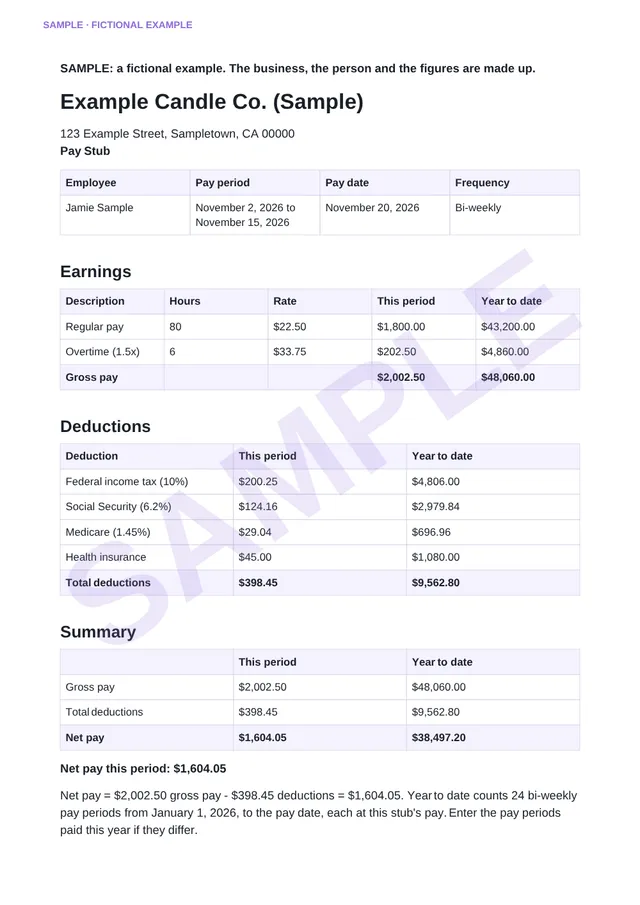
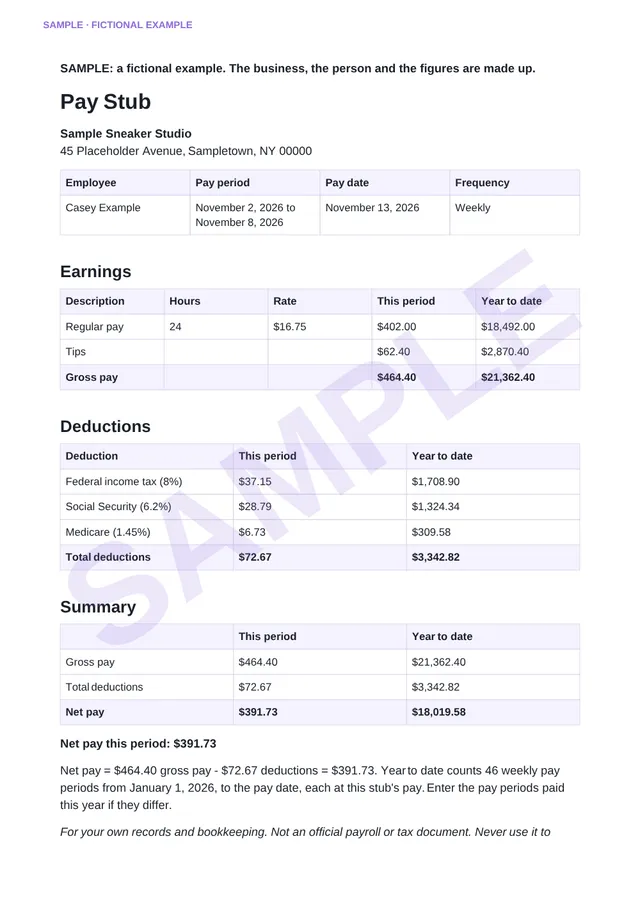
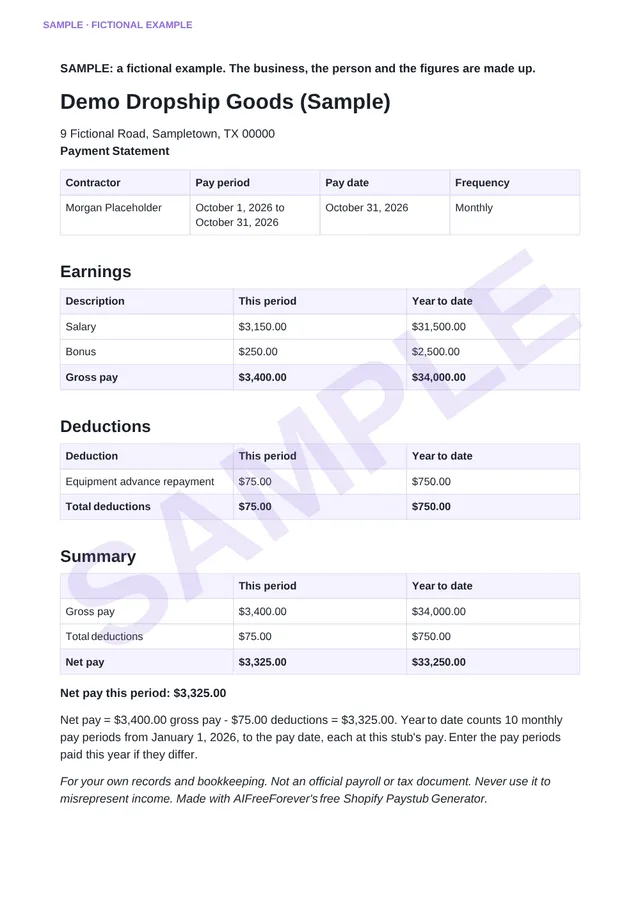
Explore three sample pay stubs provided as real PDFs, each clearly marked as SAMPLE, showcasing various pay scenarios: a bi-weekly hourly employee with overtime, a weekly part-time employee with tips, and a monthly contractor payment statement. These examples feature fictional businesses and individuals, offering store owners, bookkeepers, and contractors a glimpse into different pay types. They serve as a practical guide to understand the layout and details before generating your own pay stubs using AIFreeForever's Shopify Paystub Generator.
2 pages
2 pages
A Shopify paystub is a document that shows payment details for employees or contractors working for Shopify stores. It includes gross pay, deductions, taxes, and net pay information for a specific pay period.
Contains employee name, address, social security number, and other personal details needed for payroll documentation and tax purposes.
Shows business name, address, employer identification number, and other company details required for official payroll records.
Specifies the start and end dates of the pay period, pay date, and number of hours worked during that time frame.
Lists gross pay, taxes withheld, insurance premiums, retirement contributions, and other deductions to calculate final net pay amount.
Every figure is calculated precisely by our code, ensuring exactness to the cent.
The stub clearly shows the working: gross pay minus deductions equals net pay.
Totals are calculated from the pay date, providing comprehensive year-to-date insights.
Compare with our sample stubs before you start, aiding in understanding and customization.
A plain AI explanation of the net pay is provided, based solely on the figures, with no personal details.
Enjoy all these features without any cost, making it a valuable tool for your business.
AIFreeForever's Shopify Paystub Generator stands out with features like hourly pay with overtime at 1.5 times the rate, flexible deductions as amounts or percentages, and accurate year-to-date totals counted from the pay date.
hours × rate + overtime hours × rate × 1.5 + bonus, tips or commissioneach amount + each percentage × gross paygross pay − deductionsthis stub's pay × pay periods so far this yearThe Shopify Paystub Generator by AIFreeForever is designed to simplify the creation of pay stubs without requiring any complex calculations. Our tool reads the gross pay you input, whether it's a flat amount or calculated from hours worked at a specified rate. It pays the overtime hours you enter in line with the Fair Labor Standards Act, which mandates overtime pay at 1.5 times the regular rate for hours exceeding 40 in a workweek. Additionally, it incorporates any extras such as bonuses, tips, or commissions.
Deductions are handled with precision, allowing you to specify each as a fixed amount or a percentage of the gross pay. Common deductions include taxes and insurance, which you can input as needed. The generator then calculates the total deductions and subtracts them from the gross pay to determine the net pay. For year-to-date calculations, it multiplies the current pay by the number of pay periods completed so far in the year.
Our AI provides a clear explanation of how the net pay was calculated, ensuring transparency without revealing any personal information. Our code makes sure the pay stub adds up correctly, offering a reliable tool for your own records and bookkeeping.
AIFreeForever's Shopify Paystub Generator helps you understand pay frequencies and calculate pay periods in a year. For a pay date of November 20, 2026, it counts weekly as 47, bi-weekly as 24, semi-monthly as 22, and monthly as 11 periods. This tool adjusts the year-to-date periods based on the pay date, and the Periods Paid This Year box takes the real number when a worker started partway through the year.
| Pay frequency | Paid | Pay periods a year | Year to date on Nov 20, 2026 |
|---|---|---|---|
| Weekly | Every week | 52 | 47 |
| Bi-weekly | Every two weeks | 26 | 24 |
| Semi-monthly | Twice a month | 24 | 22 |
| Monthly | Once a month | 12 | 11 |
Professional paystubs help Shopify store owners maintain organized financial records and provide employees with proper payment documentation. These documents serve multiple business and legal purposes for e-commerce operations. With payroll documentation sorted, refocus on growing sales by writing product pages that convert using our Shopify Product Description Generator.
Well-formatted paystubs help maintain organized financial records for your Shopify business and provide clear payment documentation for accounting purposes.
Provide professional payment records for freelancers and contractors who support your Shopify store operations like customer service or marketing.
Help employees verify their income for rental applications, loan approvals, or other situations requiring proof of employment and earnings. Only ever with the real figures you paid.
Create clear records of payments and deductions to simplify tax preparation for both your business and your employees during tax season.
This paystub generator works for different types of Shopify business owners and workers who need professional payment documentation. The tool helps create proper payroll records for various e-commerce situations.
Create professional paystubs for employees and maintain organized payment records for your e-commerce business operations. You can also use our business name generator for new ventures.
Generate payment documentation for team members supporting your online business including virtual assistants, customer service reps, and marketing staff.
Create income verification documents for your Shopify-related contract work including store development, marketing, or customer support services.
Maintain professional payment records for virtual assistants and other support staff who help manage your dropshipping operations and customer service.
Generate client-branded paystubs for employees working on specific Shopify store accounts and projects. Try our professional memo generator for client communications.
Creating effective paystubs requires attention to detail and proper formatting. These tips help ensure your paystubs look professional and contain all necessary information for employees and business records.
A pay stub from AIFreeForever's Shopify Paystub Generator is a record for your business's books and for the individuals you pay. Always enter the actual figures that were paid. Never use a stub to show income that wasn't paid, as providing a false pay stub to a landlord or lender can be considered fraud. Lenders and landlords often verify income with the employer, bank statements, or tax forms. The federal Fair Labor Standards Act does not require pay stubs, and many US states have their own regulations (U.S. Department of Labor). Ensuring a clear and accurate stub for every pay period keeps your store's records organized, and AIFreeForever's generator creates one quickly.
AIFreeForever's Shopify Paystub Generator is not affiliated with Shopify and is not payroll software. It provides no tax advice and only calculates taxes you input. Each stub explicitly states it is for your own records and bookkeeping. It's crucial to use it responsibly and ensure accuracy.
Remember, this tool is designed to assist with generating pay stubs efficiently and accurately. Keep your official payroll and tax documents as well. Always verify the details and consult with a professional for tax-related matters.
Yes, you can generate unlimited paystubs without any fees, subscriptions, or credit card requirements. The tool is completely free for all users.
While our paystubs are professionally formatted, they are primarily for informational purposes. For official payroll, consult with a professional accountant or payroll service. Use them for your own records and bookkeeping, with the real figures you paid, and never to misrepresent income.
Yes, you can add multiple custom deductions with specific names and amounts to accurately reflect your payment structure and business needs. A deduction can also be a percentage of gross pay, like "Income tax 10%".
No, this tool is available to anyone who needs to create paystubs, whether or not you currently operate a Shopify store or e-commerce business.
Yes, we prioritize your privacy. The pay stub is worked out in your browser, and our AI receives only the figures to explain them. Your chats are kept only when you connect your email to save them.
Yes, you can download your generated paystub as a PDF and copy it as text for easy sharing, printing, and record keeping purposes.
You need business name, employee name, pay period dates, gross pay amount, and any deductions like taxes, insurance, or retirement contributions. If your employees clock in using AM/PM or 24-hour time, use our time clock converter to convert timecard hours to decimal format before calculating gross pay.
No, the generator uses the deductions you input, either as amounts or percentages. It provides no tax advice, so you can enter IRS employee rates for Social Security at 6.2% and Medicare at 1.45% as needed.
Yes, you can type hours at a rate, and the tool calculates overtime at 1.5 times the regular rate. This makes it easy to generate accurate pay stubs for employees with overtime hours.
No, AIFreeForever's Shopify Paystub Generator is not affiliated with Shopify. While Shopify offers its own free pay stub tool, ours is an independent solution designed to meet your needs.
Generate a detailed pay stub that adds up, showing all calculations, with the option to download it as a PDF. Ideal for your records and bookkeeping, it's a simple and free solution for creating accurate pay stubs tailored to your needs.
Tell us if this AI content is offensive, harmful or wrong. We review every report and use it to improve our filters.