Use Excel AI to build a budget, a tracker or a schedule as a working spreadsheet, for free. It does the maths for you, so your totals stay right every time you change a number.
Set your spreadsheet and columns, then say what it is forSet your spreadsheet
Spreadsheet
Tabs
Rows
@Excel
Try one of these
Some Example Spreadsheets Made with Our AI Spreadsheet Generator
Yes. AIFreeForever's Excel AI makes a whole workbook from one sentence, with real formulas, so families, sales teams and café owners can track their money and stock in minutes.
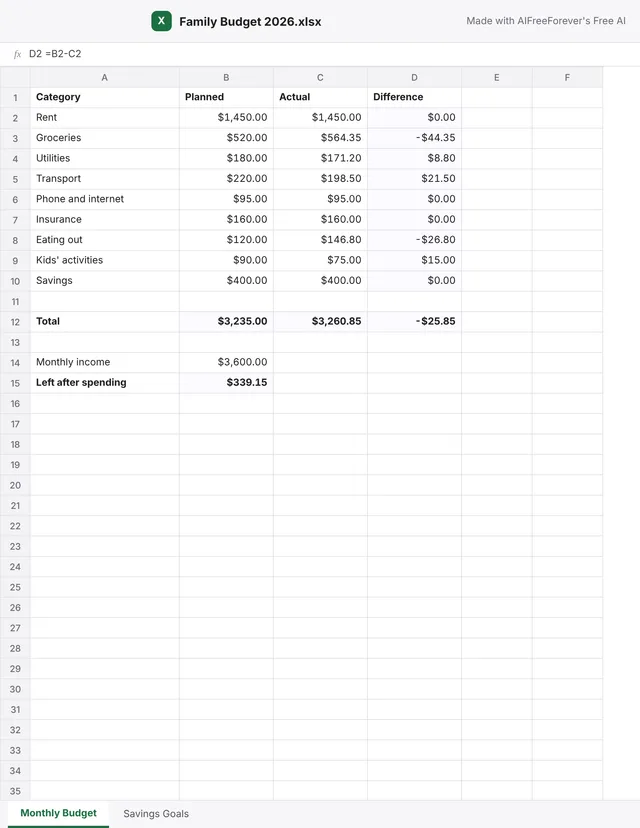
Family Budget
Designed for families planning a month, this budget tracks planned and actual spending with a savings sheet. Our free AI budget generator can plan the budget first.
AIFreeForever's Excel AI writes real formulas, splits a workbook into up to four sheets, and sets money, percent and date formats. The table below shows what you can ask for and the formula the AI puts in the cell, so you do not need to know formulas.
What you ask forThe formula in the cell
A total at the bottom of a column=SUM(B2:B10)
The difference between planned and actual=B2-C2
An average=AVERAGE(E2:E6)
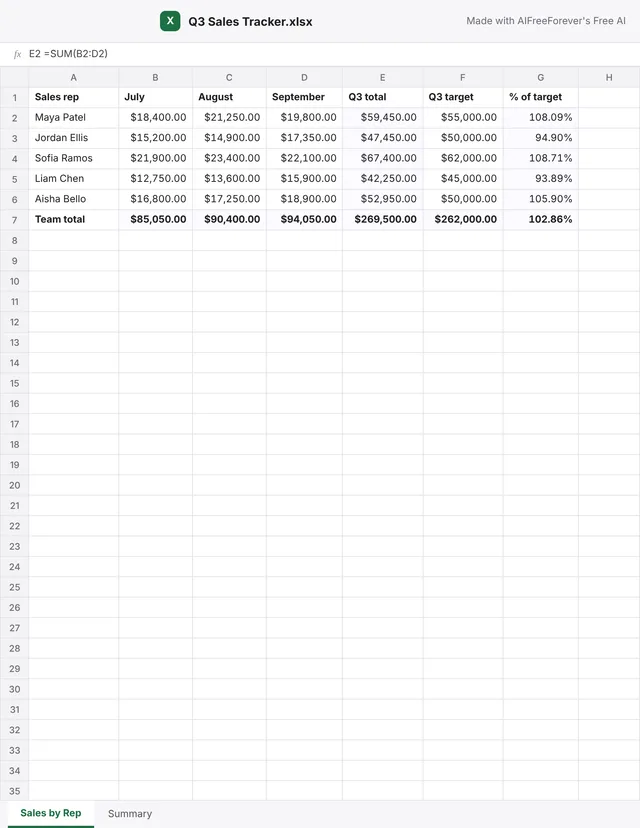
A percentage of a target=E2/F2
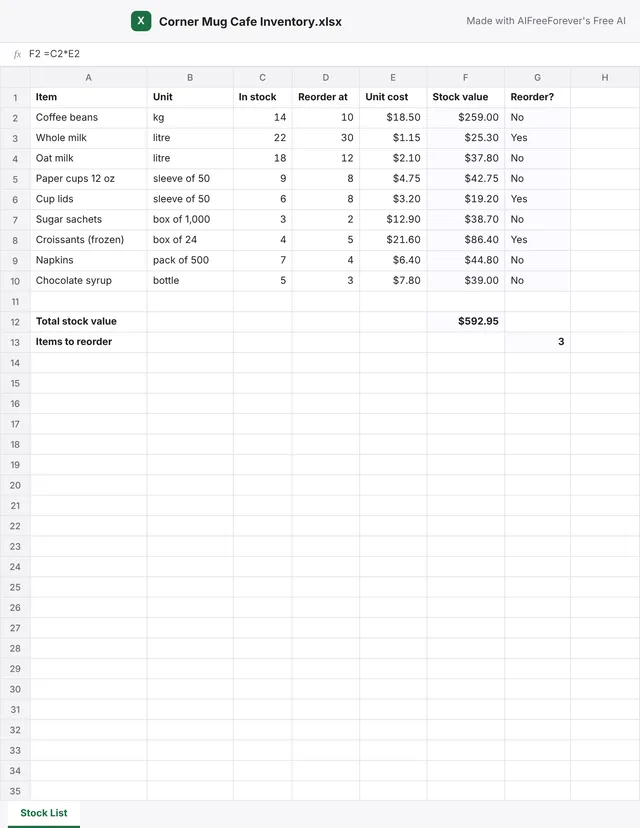
A yes or no reorder flag=IF(C2<=D2,"Yes","No")
A count of the rows that say Yes=COUNTIF(G2:G10,"Yes")
A total from another sheet='Sales by Rep'!E7
How to Make an Excel Spreadsheet with AI
1
Start simple
Begin with "a budget" to lay the foundation for your spreadsheet.
2
Add who it is for
Specify "a monthly budget for a family of four" to tailor the spreadsheet to your needs.
3
Add the columns
Include "with planned and actual columns" to organize your data effectively.
4
Add a sheet
Incorporate "and a savings sheet" to enhance your budget tracking.
A budgetYour workbook
Once you've built your request, confirm the plan, and download your personalized spreadsheet.
Spreadsheet typeSheets
BudgetSales trackerInventory
One sheetTwo sheetsSummary sheet
@ExcelAuto ▴Make Spreadsheet
Making your spreadsheet…Planning the tabs and columnsWriting the rows and formulasFormatting money and percents
Your SpreadsheetDownload .xlsx
Monthly BudgetPlanned, actual and differenceMadeSavings GoalsTargets and progress in percentMadeFormulasTotals worked out with SUMChecked
Excel AITry it for freeMake a spreadsheet with AI free on AIFreeForeveraifreeforever.com/tools/excel-ai
How to make a spreadsheet with AIon AIFreeForever
By AIFreeForeverExcel AIHowtomakeaspreadsheetwithAI
Why use our Excel AI?
Formulas, sheets and formats are set for you.
How Our AI Spreadsheet Generator Builds a Workbook
The AI never writes the file itself.
✓OperationsThe AI sends a short list of operations: start a sheet, fill cells, format a range.
✓Workbook modelOur own workbook model applies them.
✓GridThe grid beside the chat calculates every formula.
At most 60 rows a sheet when new, more can be added, while an Excel worksheet holds up to 1,048,576 rows, offering room to grow. Our exporter writes values, formulas with their last result, formats and widths, so the file opens in Excel and Google Sheets. You pick the model in the chat box.
Why choose the Excel AI by AIFreeForever?
If you already work in Microsoft 365, Copilot in Excel helps inside your file. If you need a new spreadsheet for free, AIFreeForever's Excel AI makes it from one sentence.
Copilot in Excel
Needs a Microsoft 365 Copilot licence or Microsoft 365 Premium, and works inside the file you have open.
⇄
AIFreeForever's Excel AI
Free, makes the whole workbook from a sentence and opens your own .xlsx.
Details from Microsoft Support. AIFreeForever is not affiliated with Microsoft. Excel is a trademark of Microsoft.
The Spreadsheet Planning Guide for 2026Before creating your spreadsheet with AIFreeForever's Excel AI, decide its purpose, necessary columns and desired formulas. Our free PDF guide offers a checklist to streamline your planning process.Download free PDF
Excel AI FAQs
Yes. You can make a spreadsheet with Excel AI on AIFreeForever for free. Downloading the .xlsx file is free too.
Yes. Type what you need in the chat box at the top of Excel AI and press Enter. The AI answers and checks the plan with you, then makes the spreadsheet with its formulas and formats. You download it as an .xlsx file that opens in Excel and Google Sheets.
Attach your own .xlsx or .csv file in the chat and the AI opens it in the grid. Then ask for a change in plain words, like "add a total row" or "sort by amount", and download the new file.
Yes. Totals, averages and yes or no flags are written as formulas, such as =SUM(B2:B10). They work out again when you change a number.
You get an Excel .xlsx file with all of its sheets and formulas, in the formats you saw. You can also download one sheet as a CSV file.
A new spreadsheet can have up to 4 sheets with up to 60 rows each. You can add more rows after, in the grid or by asking the chat.
Not yet. Excel AI makes the sheets, formulas and formats. You can add a chart in Excel or Google Sheets after you download the file.
Yes. Click any cell in the grid and type, or ask the chat for a change, like "add a column for tax" or "rename the sheet to 2026".
No. AIFreeForever is not affiliated with Microsoft. Excel is a trademark of Microsoft. The files you download open in Excel, Google Sheets and other spreadsheet apps.
Excel AI runs on the AI models on AIFreeForever. You pick the model in the chat box and can switch to compare. Whichever model you pick, our own grid calculates the formulas.
“
If you're looking to streamline your data management, AIFreeForever's Excel AI crafts a fully functional spreadsheet with working formulas, formats and sheets from a plan you approve. Get your .xlsx file for free, perfectly ready for Excel and Google Sheets.
This chat is stored only on your computer (in your browser's local storage) for 24 hours, then it is automatically removed. Deleting it now will permanently remove it from your device. This action cannot be undone.
Advertisement
You're leaving AIFreeForever
You're about to leave this website for our recommended partner for AI video generation.
We don't offer AI video generation yet,
therefore we will refer you to a verified partner for AI video generation. We earn a commission from this referral.
 GPT 5 Available
 DeepSeek V4 Available
 Kimi K2.6 Available
 Gemini 3.1 Available
 Grok 4 Available
 Qwen 3.7 Available
 Llama 3.1 Available
 Phi 4 Available
 Claude Haiku 4.5 Available
 GLM 5.2 by Z.ai Available
 Mistral Nemo Available
 MiMo V2.6 Flash by Xiaomi Available
 MiniMax M3.1 Flash Available
 Nex N2.5-Pro Available
 Granite 4.2 8B by IBM Available
 Command R7B by Cohere Available
 Nova Lite Available
 Reka Flash 3 Available
 Free AI spreadsheet generator