Open-source AI video models let you make videos from text or images without paying per clip. You keep your data private, avoid subscription fees, and run everything on your own computer or cheap cloud rental.
This guide walks through 31 open-source video generation models. Each section covers what the model does, how much GPU memory it needs, and what license applies. We also explain your hosting options, from cloud GPU rentals to running locally on your own hardware.
Top 10 Open-Source AI Video Models
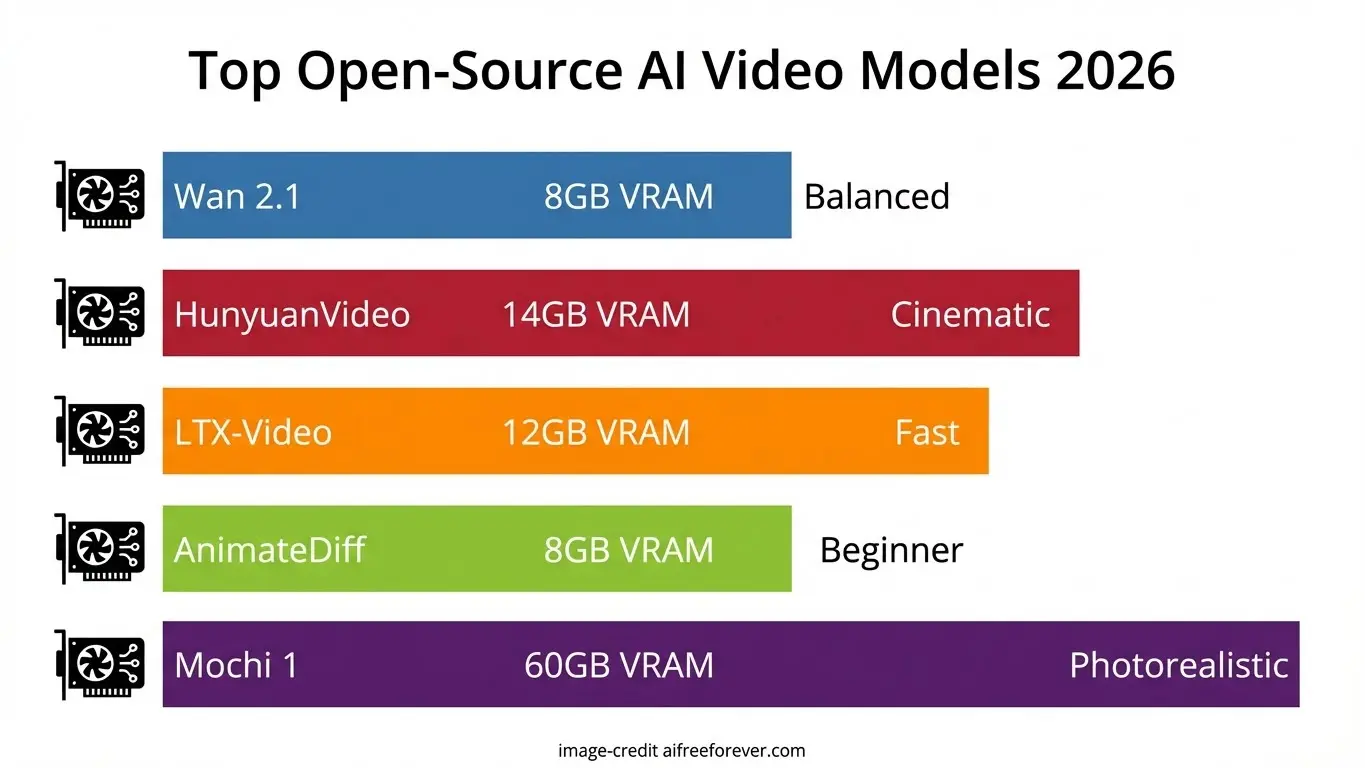
Before diving into every model, here are our top recommendations based on different needs and hardware setups.
| Model | Min VRAM | Best For |
|---|---|---|
| Wan 2.1/2.2 | 8GB | Best balance of quality and low hardware needs |
| HunyuanVideo | 14GB (v1.5) | Highest quality output for cinematic videos |
| LTX-Video | 12GB | Fast generation with ComfyUI support |
| AnimateDiff | 8GB | Beginners with mid-tier GPUs |
| CogVideoX-5B | 18GB | Academic research and fine-tuning |
| Open-Sora 2.0 | 40GB+ | Commercial-level quality on cloud GPUs |
| Mochi 1 | 60GB | Photorealistic content with LoRA support |
| SkyReels V2 | 14GB | Cinematic human subjects |
| SVD | 16GB | Image-to-video with proven stability |
| Allegro | 12GB |
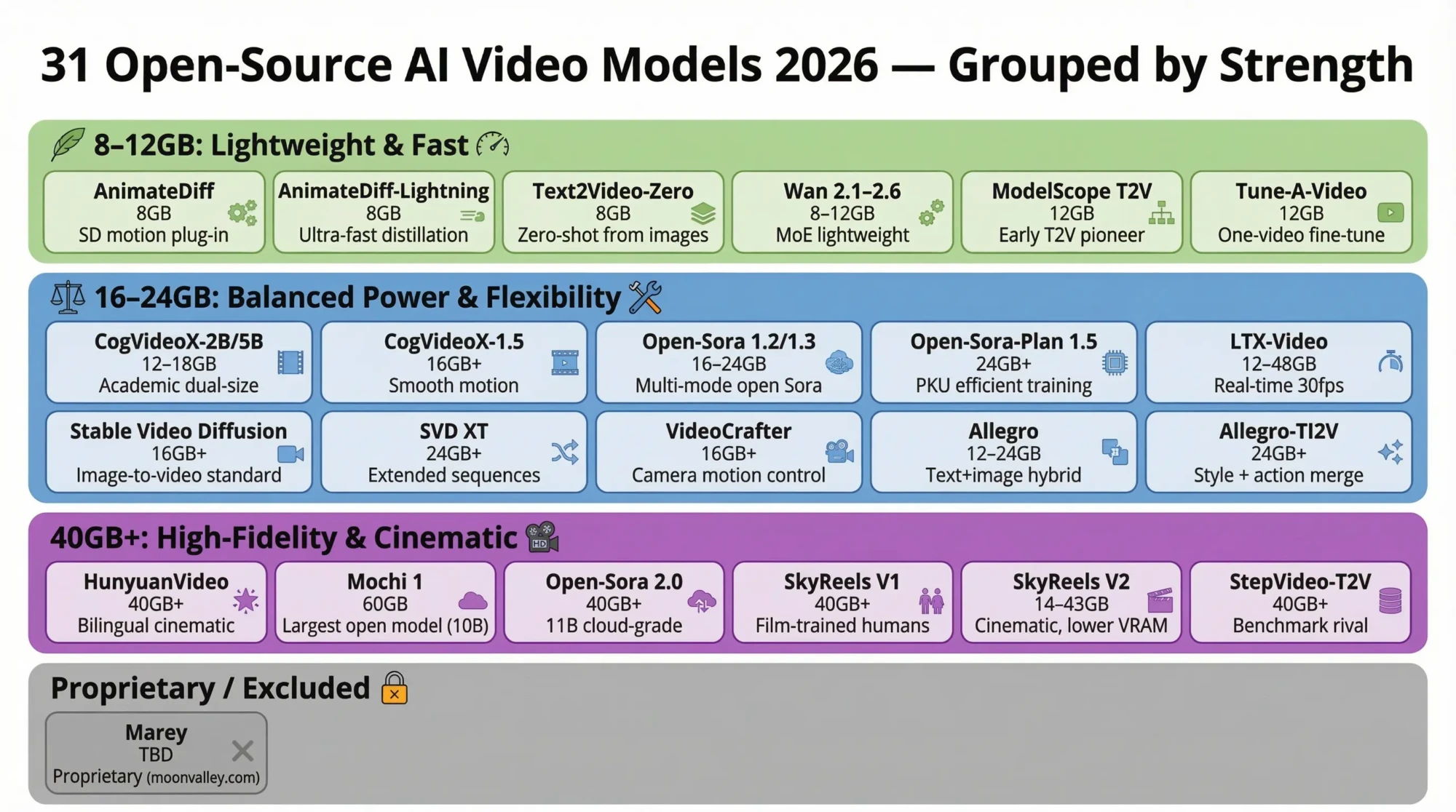
The full list
- Top 10 Quick Picks
- 1. HunyuanVideo
- 2. Wan 2.1 / 2.2 / 2.5 / 2.6
- 3. Mochi 1
- 4. CogVideoX-2B / 5B
- 5. CogVideoX-1.5
- 6. Open-Sora 1.2 / 1.3
- 7. Open-Sora 2.0 (11B)
- 8. Open-Sora-Plan 1.5
- 9. LTX-Video / LTX-2
- 10. Stable Video Diffusion (SVD)
- 11. Stable Video Diffusion XT
- 12. AnimateDiff
- 13. AnimateDiff-Lightning
- 14. ModelScope T2V
- 15. SkyReels V1
- 16. SkyReels V2
- 17. VideoCrafter / VideoCrafter2
- 18. Allegro
- 19. Allegro-TI2V
- 20. Pyramid Flow
- 21. I2VGen-XL
- 22. DynamiCrafter
- 23. LaVie
- 24. Show-1
- 25. Latte
- 26. StepVideo-T2V
- 27. SEINE
- 28. Text2Video-Zero
- 29. Tune-A-Video
- 30. VideoComposer
- 31. Marey
- Cloud GPU Hosting Options
- Local Hosting Setup
- Choosing the Right Model
1. HunyuanVideo by Tencent
Tencent built HunyuanVideo as their flagship open video model. The original release packed 13 billion parameters and needed serious GPU power. Version 1.5 trimmed this to 8.3 billion parameters while boosting speed. Now it runs on GPUs with 14GB of VRAM when using offloading.
The architecture combines a Diffusion Transformer with a 3D causal VAE. This setup compresses video data by 16x spatially and 4x over time. Motion stays smooth and visual detail holds up well, even without top-tier hardware.
What sets it apart:
- Handles both text-to-video and image-to-video generation
- Accepts prompts in English and Chinese
- SSTA attention mechanism doubles inference speed
- Produces 5-10 second clips at 720p or 1080p with upscaling
Min VRAM: 60-80GB (original) / 14GB (v1.5 with offload)
License: Open (Tencent HunyuanVideo Community License)
Link: github.com/Tencent-Hunyuan/HunyuanVideo
2. Wan 2.1 / 2.2 / 2.5 / 2.6 by Alibaba
Alibaba’s Tongyi Lab created Wan with accessibility in mind. The smallest 1.3B version runs on just 8GB of VRAM. Larger 14B variants deliver better quality for those with more powerful hardware.
Version 2.2 introduced a Mixture-of-Experts (MoE) design. Different experts handle high-noise and low-noise generation stages. You get sharper detail without paying extra compute costs. The 2.5 release pushed 720p generation 30% faster than before.
Why creators pick Wan:
- Runs on consumer cards like RTX 3060
- MoE architecture makes smart use of resources
- Supports text-to-video and image-to-video workflows
- Apache 2.0 license allows commercial projects
Min VRAM: 8-24GB
License: Apache 2.0
Link: github.com/Wan-Video/Wan2.1
3. Mochi 1 by Genmo AI
Mochi 1 holds the title of largest open video model at 10 billion parameters. Genmo AI built it from scratch using their Asymmetric Diffusion Transformer design. Photorealistic content and strong prompt following are its strengths.
The custom AsymmVAE compresses video to 128x smaller. It applies 8×8 spatial and 6x temporal compression into a 12-channel latent space. Despite the massive parameter count, generation stays efficient on proper hardware.
Notable capabilities:
- Largest openly available video generation model
- Excellent prompt adherence and motion quality
- LoRA support for custom fine-tuning
- ComfyUI integration through community wrappers
Min VRAM: 60GB (single GPU)
License: Apache 2.0
Link: github.com/genmoai/mochi
4. CogVideoX-2B / 5B by Tsinghua THUDM
Tsinghua University and Zhipu AI released CogVideoX in two sizes. The 2B variant fits lighter hardware while 5B pushes quality higher. Both generate 6-second clips at 720×480 resolution with 8 frames per second.
Running in bfloat16 format produces the best output. English prompts can stretch to 226 tokens, giving room for detailed scene descriptions. Recent updates extended clips to 10 seconds at 720p.
Practical advantages:
- Two model sizes suit different GPU budgets
- Solid documentation from the academic team
- Diffusers integration simplifies setup
- Regular updates improve performance over time
Min VRAM: 12-18GB
License: Apache 2.0
Link: github.com/THUDM/CogVideo
5. CogVideoX-1.5 by Tsinghua THUDM
Building on earlier versions, CogVideoX-1.5 refines motion handling. Frame transitions look smoother and more natural. Researchers experimenting with video generation find it fits well into existing workflows.
The Hugging Face Diffusers library loads this model with just a few lines of Python. Academic backing means clear explanations of the underlying methods and thorough documentation.
Min VRAM: 16GB+
License: Apache 2.0
Link: github.com/THUDM/CogVideo
6. Open-Sora 1.2 / 1.3 by HPC-AI Tech
Open-Sora aims to replicate what OpenAI’s Sora achieves, but with open weights anyone can use. Version 1.2 brought a 3D-VAE and rectified flow training. Version 1.3 upgraded the VAE and Transformer for noticeably better video quality.
Training drew from millions of video clips. The model handles text-to-video, image-to-video, video-to-video, and infinite time generation. Output ranges from 2 to 15 seconds at resolutions up to 720p.
Standout features:
- Multiple generation modes in a single model
- Variable length and resolution output
- Full training code available for customization
- Gradio demo hosted on Hugging Face Spaces
Min VRAM: 16-24GB
License: Apache 2.0
Link: github.com/hpcaitech/Open-Sora
7. Open-Sora 2.0 (11B) by HPC-AI Tech
Open-Sora 2.0 scaled up to 11 billion parameters. Benchmark tests put it alongside HunyuanVideo and Step-Video. The team estimates training a commercial-grade model costs around $200k, making this level of quality accessible to smaller companies.
Flux integration improves text-to-image as part of the pipeline. Cinematic quality comes through at 256px or 768px resolution. Full training code is publicly available, which is rare at this performance tier.
Technical highlights:
- Unified text-to-video and image-to-video pipeline
- Flux integration strengthens text understanding
- Open training code for complete transparency
- MIT-licensed training datasets
Min VRAM: 40GB+
License: Apache 2.0
Link: github.com/hpcaitech/Open-Sora
8. Open-Sora-Plan 1.5 by PKU Yuan Group
Peking University’s Open-Sora-Plan takes a different path than HPC-AI Tech’s version. The focus lands on efficient training and manageable hardware requirements. Version 1.5 improved motion quality while keeping compute costs in check.
Open-source datasets and detailed documentation support the project. Researchers wanting to understand video models from the ground up can follow their training recipes.
Min VRAM: 24GB+
License: MIT
Link: github.com/PKU-YuanGroup/Open-Sora-Plan
9. LTX-Video / LTX-2 by Lightricks
Lightricks, known for popular mobile editing apps, built LTX-Video for speed. The model generates 30fps videos at 1216×704 faster than real time on capable hardware. Rapid prototyping becomes practical.
Multiple variants exist: 13B dev, 13B distilled, 2B distilled, and FP8 quantized builds. Spatial and temporal upscalers extend capabilities. Ready-made ComfyUI workflows cut setup time significantly.
Speed and flexibility perks:
- Faster than real-time video generation
- Text-to-video, image-to-video, and video-to-video modes
- Pre-built ComfyUI workflows included
- Multiple model sizes for various hardware
Min VRAM: 12-48GB
License: Open
Link: github.com/Lightricks/LTX-Video
10. Stable Video Diffusion (SVD) by Stability AI
Stability AI, the team behind Stable Diffusion, created SVD for image-to-video generation. Hand it a still image and it produces natural motion. The approach works well for adding subtle movement to photos or artwork.
Building on the proven Stable Diffusion architecture means compatibility with existing SD tools. Many ComfyUI nodes already support it. A large community has battle-tested the model extensively.
Why SVD remains popular:
- Strong image-to-video performance
- Works within the existing SD ecosystem
- Large community with extensive documentation
- Proven stability in production environments
Min VRAM: 16GB+
License: Open (Stability AI Community License)
Link: github.com/Stability-AI/generative-models
11. Stable Video Diffusion XT by Stability AI
SVD XT extends the base model for longer video generation. While standard SVD makes short clips, the XT version produces extended sequences with better consistency across frames.
The same image-to-video focus applies. Best results come when you start with a frame you want to animate. Complex text prompts work less reliably here.
Min VRAM: 24GB+
License: Open
Link: huggingface.co/stabilityai/stable-video-diffusion-img2vid-xt
12. AnimateDiff by Community
AnimateDiff brings motion to Stable Diffusion image generation without building an entirely new video model. It plugs into existing SD workflows. Your favorite checkpoints and LoRAs still work.
Motion modules learn temporal patterns while leaving the base image model unchanged. You get the style of your chosen checkpoint plus smooth animation. This combination made AnimateDiff one of the most widely used open video tools.
What makes it accessible:
- Compatible with existing SD checkpoints
- Works alongside LoRAs and ControlNet
- Modest hardware requirements
- Massive community and resource library
Min VRAM: 8-12GB
License: Apache 2.0
Link: github.com/guoyww/AnimateDiff
13. AnimateDiff-Lightning by ByteDance
ByteDance applied distillation to make AnimateDiff dramatically faster. Generation steps dropped from dozens to just a handful. Quality holds up while time shrinks.
Quick tests and iterations that took minutes now finish in seconds. Compatibility with the original AnimateDiff ecosystem remains intact.
Min VRAM: 8GB
License: Open
Link: huggingface.co/ByteDance/AnimateDiff-Lightning
14. ModelScope T2V by Alibaba DAMO
Alibaba’s DAMO Academy released ModelScope Text-to-Video as an early open text-to-video option. Newer models have surpassed its quality, but it remains useful for learning and quick prototypes.
Integration with the broader ModelScope ecosystem is straightforward. If you already use ModelScope for other AI tasks, adding video generation takes minimal effort.
Min VRAM: 12GB
License: Apache 2.0
Link: github.com/modelscope/modelscope
15. SkyReels V1 by Skywork AI
SkyReels V1 fine-tuned HunyuanVideo on over 10 million film and TV clips. The emphasis falls on realistic humans with detailed facial expressions. Storytelling content where characters need to look convincing benefits most.
Cinematic training shows in the output. Videos feel closer to film footage than typical AI generations. Short films, ads, and content needing professional polish work well here.
Cinematic strengths:
- Trained on 10M+ film and television clips
- Realistic human character generation
- Professional-grade output quality
- Built on HunyuanVideo foundation
Min VRAM: 40GB+
License: Apache 2.0
Link: github.com/SkyworkAI/SkyReels
16. SkyReels V2 by Skywork AI
SkyReels V2 lowered hardware requirements while keeping the cinematic focus. Depending on the variant, it runs on GPUs from 14GB to 43GB. More users can now access SkyReels quality.
Human-centric training carries over from V1. Realistic faces and natural movement remain priorities. Efficiency gains come from architectural improvements rather than quality sacrifices.
Min VRAM: 14-43GB
License: Apache 2.0
Link: github.com/SkyworkAI/SkyReels-V2
17. VideoCrafter / VideoCrafter2 by Tencent ARC Lab
Tencent’s Applied Research Center developed VideoCrafter for both text-to-video and image-to-video generation. Version 2 improved quality and added better camera motion control.
Flexibility stands out. You can guide camera paths, control subject movement, and adjust pacing. Creators needing specific shots rather than random generations appreciate this level of control.
Min VRAM: 16GB+
License: Apache 2.0
Link: github.com/AILab-CVC/VideoCrafter
18. Allegro by Rhymes AI
Rhymes AI built Allegro with flexible input options. It accepts both text prompts and image conditioning. Hardware requirements stay moderate, fitting the 12-24GB VRAM range.
The Apache 2.0 license makes Allegro suitable for commercial work. Modify it, fine-tune it, use outputs in products—no extra licensing headaches.
Min VRAM: 12-24GB
License: Apache 2.0
Link: github.com/rhymes-ai/Allegro
19. Allegro-TI2V by Rhymes AI
Allegro-TI2V combines text and image inputs for video generation. Provide both a text description and a reference image. The model merges them into video that follows your written intent while preserving visual style from the image.
This hybrid method gives more control than pure text-to-video. Set the look with an image, describe the action in text. Brand work requiring visual consistency benefits from this approach.
Min VRAM: 24GB+
License: Apache 2.0
Link: github.com/rhymes-ai/Allegro
20. Pyramid Flow by PKU and Kuaishou
Peking University and Kuaishou collaborated on Pyramid Flow. A pyramid structure drives efficient generation. The model starts at low resolution and progressively adds detail. Speed improves while quality stays high.
Compute resources get used effectively. Results look reasonable on 16GB cards and improve as VRAM increases. The MIT license welcomes both research and commercial applications.
Min VRAM: 16GB+
License: MIT
Link: github.com/jy0205/Pyramid-Flow
21. I2VGen-XL by Alibaba DAMO
I2VGen-XL specializes in turning still images into video. Give it a photo and it generates motion that looks natural. Alibaba DAMO designed it for high-fidelity output with semantic understanding of the input.
The XL designation signals extended capabilities. Complex scenes and longer clips maintain better consistency than earlier versions. The model understands which objects should move and how they should behave.
Min VRAM: 16GB
License: Open
Link: github.com/ali-vilab/i2vgen-xl
22. DynamiCrafter by Tencent AI Lab
Tencent AI Lab designed DynamiCrafter to animate still images with natural motion. It adds life to photos and artwork. Subtle movements like hair blowing or water flowing look particularly good.
Image quality stays intact as motion appears. Your input image remains sharp while elements within it begin moving. This differs from models that regenerate the entire scene.
Min VRAM: 16GB+
License: Apache 2.0
Link: github.com/Doubiiu/DynamiCrafter
23. LaVie by Shanghai AI Lab
Shanghai AI Lab created LaVie for high-fidelity video synthesis. The name stands for Language-to-Video generation. A cascaded approach combines base generation with super-resolution stages.
Output looks clean with good temporal consistency. Frames stay coherent throughout playback. Content needing polished results without manual cleanup suits LaVie well.
Min VRAM: 24GB+
License: Apache 2.0
Link: github.com/Vchitect/LaVie
24. Show-1 by Show Lab (NUS)
The National University of Singapore’s Show Lab built Show-1 by combining multiple components. This multi-part approach handles diverse prompts better than single-model designs.
Research applications drive the project. Detailed papers explain the inner workings. Academics building on existing video generation research find useful foundations here.
Min VRAM: 24GB+
License: Apache 2.0
Link: github.com/showlab/Show-1
25. Latte by Monash University
Latte stands for Latent Diffusion Transformer. Monash University optimized it for efficient training on video data. GPU resources get used well during both training and inference.
The model serves as a research platform. Training code lets you run your own experiments. Documentation covers technical details thoroughly.
Min VRAM: 16GB
License: Apache 2.0
Link: github.com/Vchitect/Latte
26. StepVideo-T2V by StepFun
StepFun positioned StepVideo as a serious text-to-video option. Benchmark results compete with HunyuanVideo. Complex prompts and quality motion come through reliably.
The open release includes weights and code for local deployment. Quality matches commercial closed-source alternatives.
Min VRAM: 40GB+
License: Open
Link: github.com/stepfun-ai/Step-Video-T2V
27. SEINE by PKU
Peking University built SEINE for short-to-long video synthesis with scene transitions. Complex videos featuring multiple scenes benefit. Coherent transitions between different visual contexts work smoothly.
Storytelling content gains the most. Prompt a sequence of scenes and get smooth transitions between them. Longer narratives become practical.
Min VRAM: 16GB
License: Open
Link: github.com/Vchitect/SEINE
28. Text2Video-Zero by Picsart AI Research
Picsart AI Research achieved video generation without any video training data. The model extends existing image models by adding temporal consistency through frame conditioning.
The zero-shot approach keeps hardware needs low. No massive video model to load. Quick experiments become easy.
Min VRAM: 8GB
License: Open
Link: github.com/Picsart-AI-Research/Text2Video-Zero
29. Tune-A-Video by Show Lab (NUS)
Show Lab at NUS created Tune-A-Video for personalized video generation. Fine-tune the model on a single video example. It learns to generate similar content from that one sample.
Specific styles or subjects benefit from this approach. Create a model matching your brand look or featuring a particular character. Training stays fast since you only need one video.
Min VRAM: 12GB
License: Apache 2.0
Link: github.com/showlab/Tune-A-Video
30. VideoComposer by Alibaba DAMO
Alibaba DAMO built VideoComposer to accept multiple conditioning inputs. Guide it with text, images, motion vectors, depth maps, or combinations. Mix and match controls as needed.
Want video following a specific motion path but using colors from a reference image? VideoComposer handles that. Precise creative control becomes possible.
Min VRAM: 24GB
License: Open
Link: github.com/ali-vilab/videocomposer
31. Marey by Moonvalley
Moonvalley developed Marey as part of their video AI focus. Hardware requirements remain unclear as of this writing. The model carries a proprietary license despite association with open efforts.
Access comes through moonvalley.com. Check their site for current availability, requirements, and pricing.
Min VRAM: TBD
License: Proprietary
Link: moonvalley.com
Cloud GPU Hosting Options
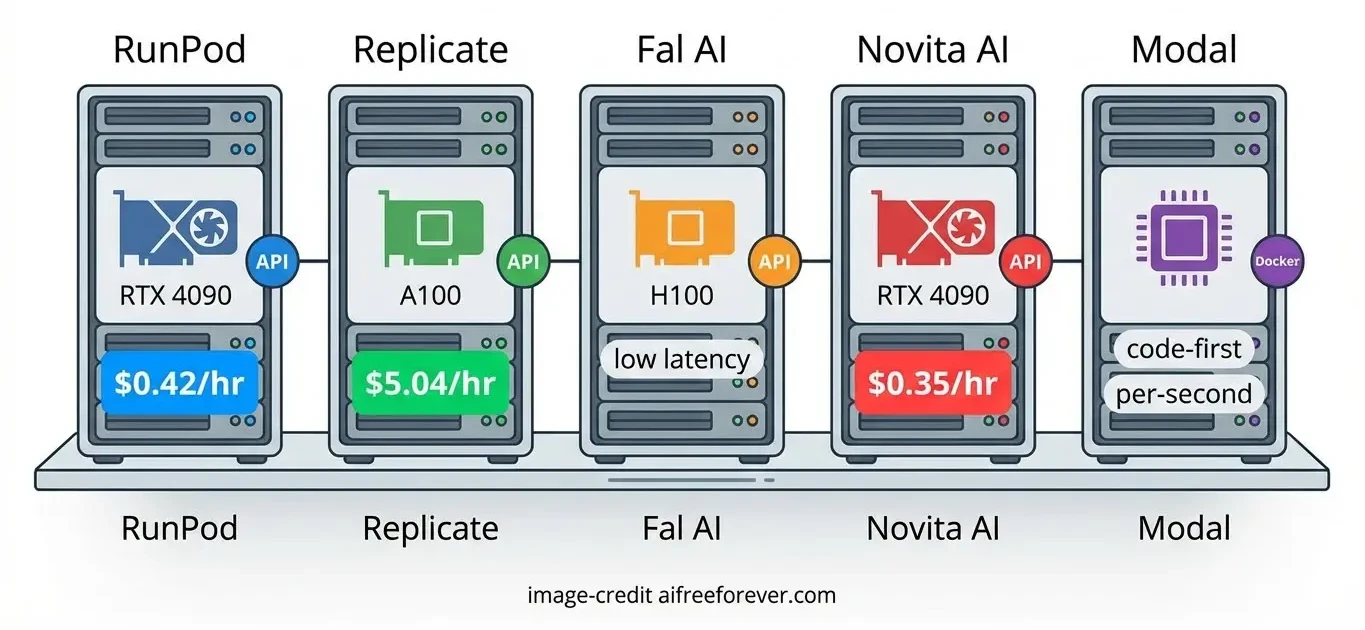
Cloud hosting lets you rent powerful GPUs by the hour. Skip the upfront cost of buying hardware. This works well for testing models or running occasional jobs.
RunPod
RunPod spins up GPU pods in under a minute. Over 30 GPU models are available including RTX 4090, A100, and H100. Billing happens by the millisecond, so you pay only for actual use.
Video generation works smoothly on the platform. Docker templates exist for common setups. Deploy Open-Sora, CogVideoX, or other models using pre-built containers. Storage persists between sessions when needed.
Typical pricing:
- RTX 4090: around $0.42/hour
- A100 80GB: around $1.99/hour
- H100: around $3.99/hour
- Serverless options available for API-style deployment
Replicate
Replicate prioritizes simplicity. Thousands of models run via API without managing containers or GPUs. Call their API and get results back.
The trade-off is less control. You use their hosted model versions. Custom deployments exist but cost more and have slower cold starts (sometimes 60+ seconds). Pricing runs higher than bare GPU rental but covers all infrastructure work.
Typical pricing:
- A100: around $5.04/hour ($0.0014/second)
- Scale to zero when idle
- Pre-built models ready immediately
Other Cloud Platforms
Fal AI specializes in generative media with H100 and A100 GPUs. Low latency suits production deployments. Contact sales for detailed pricing.
Baseten uses their Truss framework to simplify model serving. Containerization happens automatically. Free tier scales up to unlimited on Pro/Enterprise plans.
Novita AI targets budget users with prices as low as $0.35/hour for RTX 4090. Even lower rates exist for RTX 3090.
Modal appeals to developers preferring code-first deployment. Write Python and they handle the cloud part. Per-second billing with no fixed costs.
Local Hosting Setup
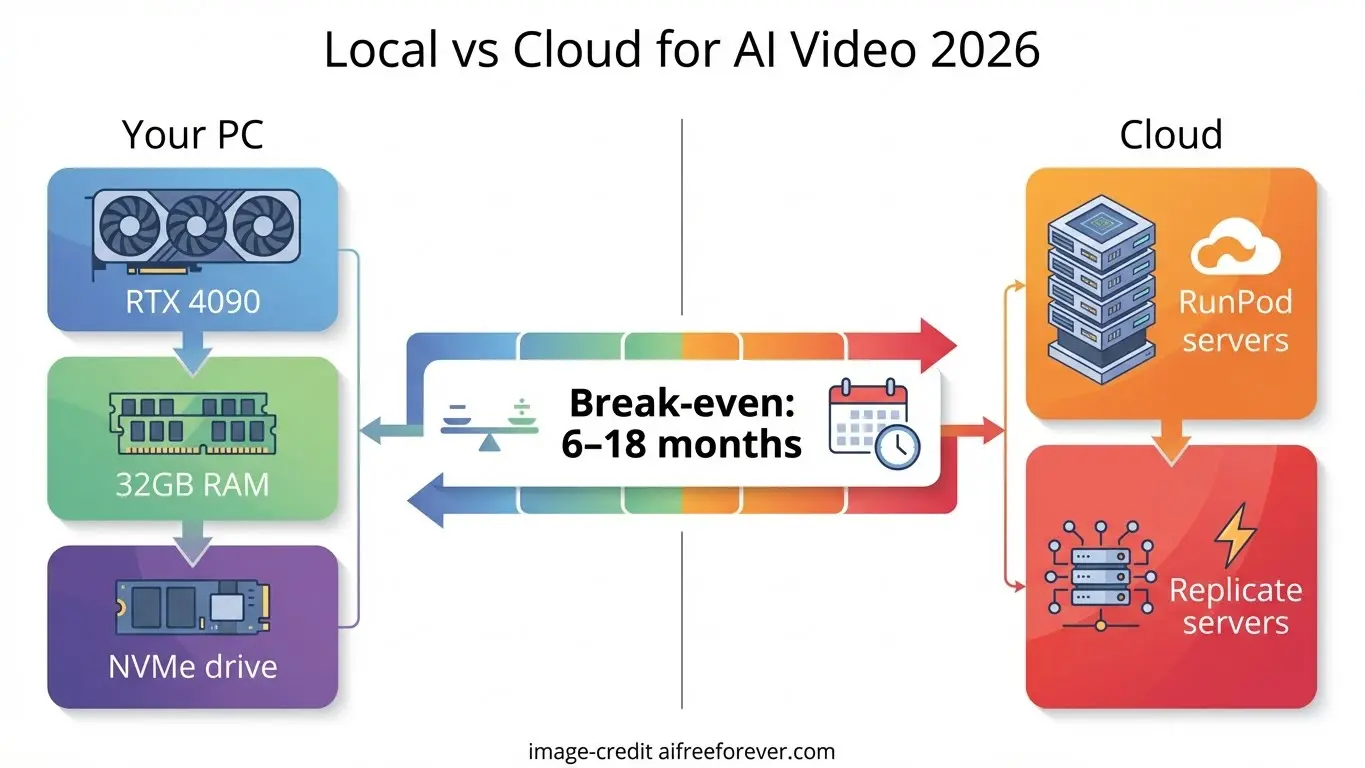
Running models on your own hardware means no per-use fees. Pay once for the GPU and use it indefinitely. Break-even versus cloud services typically happens between 6-18 months depending on usage volume. Unlock censorship
Hardware Requirements
Video generation needs more VRAM than image generation. Here is what different GPU levels handle:
- 8GB VRAM (RTX 3060, 4060): AnimateDiff, Text2Video-Zero, Wan 2.1 small
- 12GB VRAM (RTX 3060 12GB, 4070): LTX-Video, Allegro, CogVideoX-2B
- 16GB VRAM (RTX 4080, A4000): SVD, DynamiCrafter, Latte, SEINE
- 24GB VRAM (RTX 4090, A5000): Most open-source models with optimization
- 40GB+ VRAM (A100, H100): Full-size Mochi, Open-Sora 2.0, SkyReels V1
Beyond GPU, you need:
- 32GB+ system RAM (64GB works better)
- NVMe SSD for model storage (1TB minimum)
- Recent CPU (12th gen Intel i5 or equivalent)
ComfyUI Setup
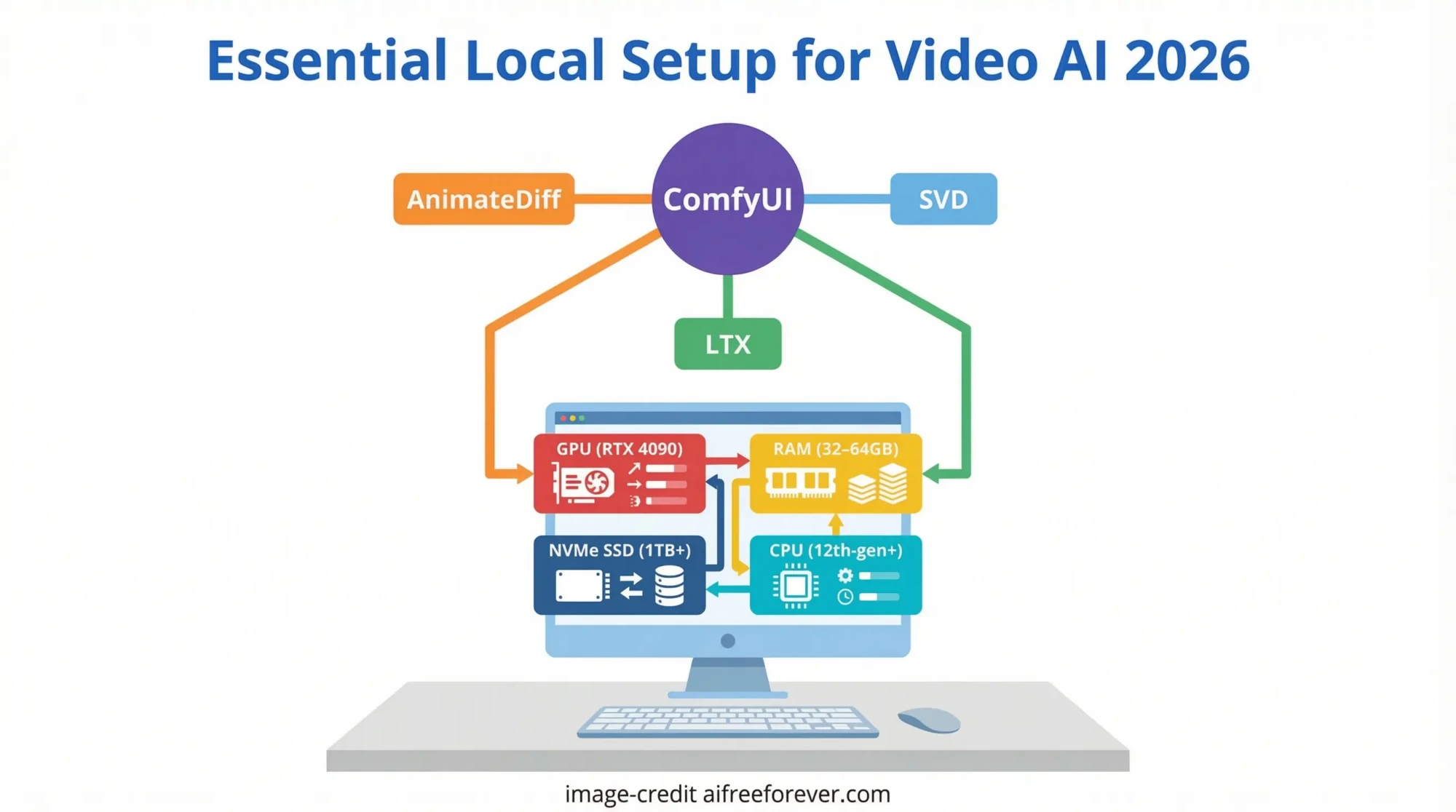
ComfyUI is the most popular interface for running video models locally. It uses a node-based workflow where you connect components visually. Most open-source video models have ComfyUI nodes available.
Basic setup steps:
- Clone the ComfyUI repository from GitHub
- Install Python dependencies with pip
- Download model weights to the models folder
- Install custom nodes for your chosen video model
- Launch ComfyUI and load a workflow
RTX 4090 users should add these launch flags: –highvram –cuda-malloc –use-pytorch-cross-attention. These settings maximize VRAM use and enable GPU optimizations.
Optimization Tips
- FP8 or GGUF quantized models cut VRAM needs significantly
- Model offloading moves unused parts to system RAM
- Generate at lower resolution first, then upscale
- Fewer inference steps speed up testing
- Keep batch size at 1 for video generation
- Update PyTorch and CUDA drivers regularly
Choosing the Right Model
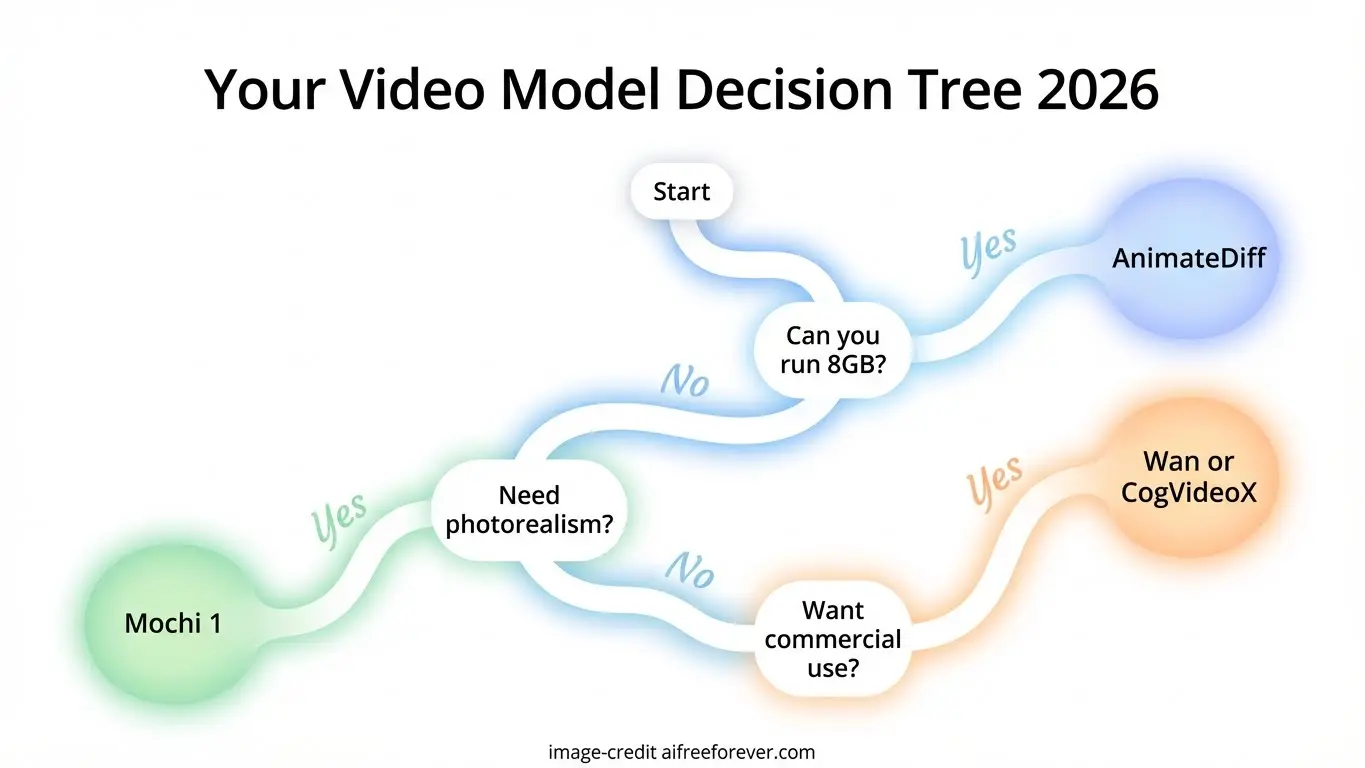
Your choice depends on three factors: hardware, use case, and license requirements.
Limited hardware (8-12GB VRAM): Start with AnimateDiff, Wan 2.1 small variants, or Text2Video-Zero. These run on mid-range gaming GPUs. Quality works well for testing ideas and social media content.
Prosumer hardware (16-24GB VRAM): LTX-Video, CogVideoX, and HunyuanVideo 1.5 hit a sweet spot. Quality approaches commercial tools while running on RTX 4090. Serious content creation becomes viable.
Cloud or enterprise (40GB+ VRAM): Mochi 1, Open-Sora 2.0, and SkyReels V1 deliver top-tier results. Deploy on RunPod or similar. Costs accumulate but quality matches closed-source competition.
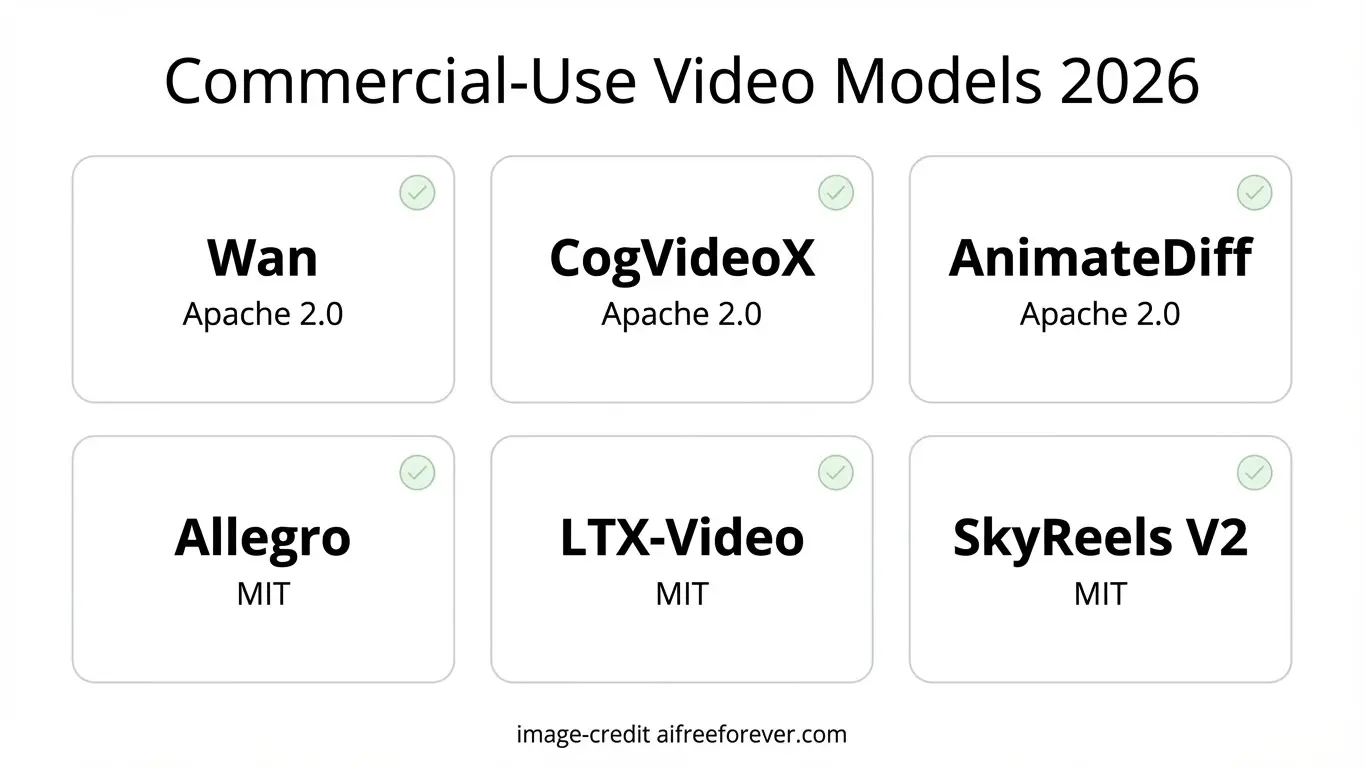
Commercial projects: Check the license carefully. Apache 2.0 (Wan, CogVideoX, AnimateDiff) is safest for business use. Some Tencent models have territorial restrictions. Read the fine print before shipping products.
The open-source video AI space moves rapidly. Models leading today may be surpassed next month. Competition keeps pushing quality higher and hardware requirements lower. Whatever you choose now, better options will emerge. Build your workflow, learn the tools, and upgrade as new models release.