What Are Free AI Tools?
Free AI tools are software programs that use artificial intelligence and cost nothing to use. Some give you full access without payment, while others use a freemium model where the basic version is free and advanced features cost money. Open source AI tools are also free, and you can download and run them on your own computer. Examples include Stable Diffusion 3.5 for images and Llama 3.3 70B for text.
large language models
In 2026, free AI tools use large language models and diffusion models to create content. These models run on powerful servers in the cloud, and the companies behind them pay for the computing power so you get to use the results for free. Some free tools require an account, but others let you start immediately. You can find 100% free AI tools with no login with no login on our platform.
In addition to this, the term free AI tool covers many products. Some are SaaS products that run in your browser, while others are software you install locally.
Generative AI tools
Generative AI tools create new content from prompts, and foundation models like GPT-5.3 and Llama 4 Scout power many free applications. You do not need technical skills to use most of these tools because they work through simple chat interfaces or web forms. You type what you want, and the AI generates the result in seconds.

How Free AI Tools Work in 2026
Free AI tools rely on two core technologies: the large language model, or LLM, and the diffusion model. LLMs drive text tools like ChatGPT and Claude, and they use transformer architecture to process language. During training, the model reads billions of text examples from books, websites, and other sources, and it learns patterns, grammar, and facts through neural networks with billions of parameters.
When you type a prompt, the model uses inference to predict the next token, which is a piece of a word. It builds one token at a time until the response is complete, and this happens in seconds. The model does not think like a human. It predicts what words should come next based on training data.
Temperature settings control how creative or predictable the output is.
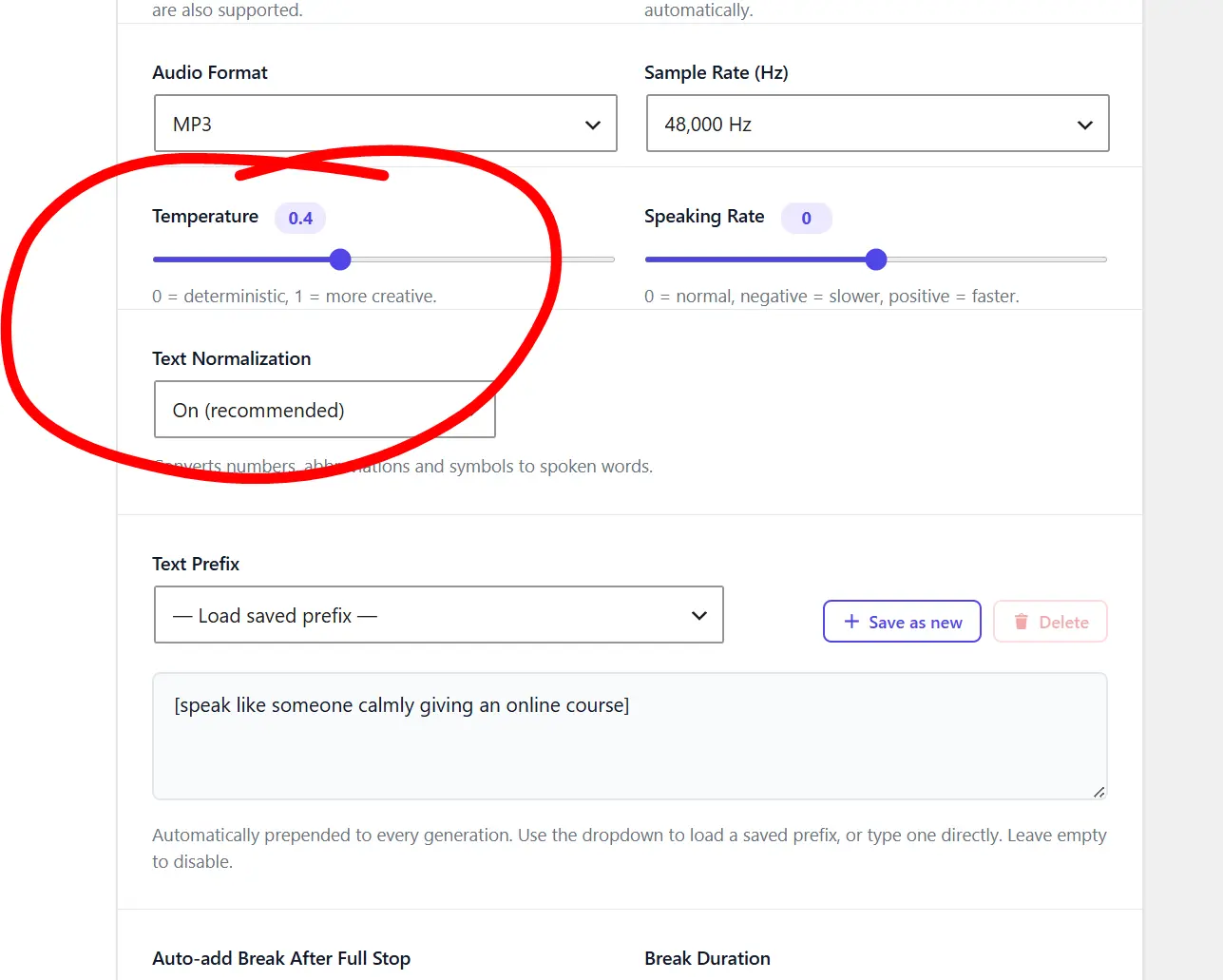
Lower temperature gives more focused answers. Higher temperature gives more varied responses. Prompt engineering helps you get better results by structuring your input clearly.
Diffusion models
Diffusion models power image tools like GPT Image 2 and FLUX. They start with random noise. Then they remove the noise step by step. The model follows your text prompt to guide the denoising process. It uses training data to know what objects look like. The final output is a clear image. You do not need to understand neural networks or complex math to use these tools. You just type a prompt and get a result since cloud computing lets the foundation model do the hard work on remote servers instead of your device.
Reasoning models
Reasoning models like GPT-5.5 can break complex problems into smaller parts. However, most free tiers do not include agentic features. Free users get basic inference without advanced reasoning chains. The tool processes your input and returns a single response. It does not browse the internet or run code unless you pay for premium access.
What about Agentic AI?
Types of Free AI Tools
- Free AI tools fall into five main categories.
- Writing tools generate and edit text.
- Image tools create pictures from prompts.
- Code tools help programmers write and debug software.
- Video tools make short clips and animations.
- Audio tools handle speech, music, and sound effects.
Multimodal AI
Some tools are multimodal AI. This means they handle both text and images in one system.
What are the most common types of Free AI Tools?
Writing tools are the most common type of free AI tool. They use LLMs to answer questions, draft emails, and summarize articles. Image tools use diffusion models and latent space mathematics to turn text descriptions into visual art. Code tools use fine-tuned language models that interpret programming syntax. Video tools use motion diffusion to create short animated clips. Audio tools use neural networks trained on hours of sound.
Most free tools focus on one category, but a few combine several functions. Some chatbots can now analyze images you upload, and this is multimodal AI in action. Agentic AI tools can perform tasks across multiple steps, but these are rare in free tiers. The free AI tool market in 2026 covers all these categories with strong options in each one, so you can build a complete workflow using only free tools.
Free AI Writing Tools
Writing tools are the most popular free AI category. ChatGPT free uses GPT-5.3. You get 10 messages every 5 hours. After that, the system switches to GPT-5 Mini automatically. GPT-5 Mini handles simple tasks well. It can write emails, answer questions, and help with brainstorming. Claude offers a free tier with Sonnet 4.6. It has a large context window and strong reasoning. Many users prefer Claude for long documents and detailed analysis.
Gemini 3.1 Pro from Google is free with a Google account. It connects to Google search and other services. This makes it strong for research tasks. Llama 3.3 70B and Llama 4 Scout from Meta are open source. You can run them locally or use them through free hosting sites. Llama 4 Scout supports 10 million tokens of context. This is useful for analyzing entire books or large codebases. Perplexity offers free search with AI summaries. It cites sources, which helps with fact checking.
These tools help with emails, essays, brainstorming, and research. They use natural language processing to read your requests. You can ask for outlines, drafts, or edits. Some tools offer prompt engineering templates to improve results. Rate limiting applies to most free tiers. You cannot send unlimited messages. But for casual use, the limits are usually enough. You can try free AI tools without login for quick writing tasks.
Free writing tools have some limits. They may hallucinate facts. Always verify important information. They also lack advanced features like custom instructions or system prompts. These features require paid plans. Still, the free versions handle everyday writing tasks with high quality. GPT-5.3 produces coherent text with few errors. It reads context across long conversations. It can follow complex instructions and adapt its tone based on your needs.
Free AI Image Tools
Image generation has improved dramatically in 2026.
- GPT Image 2 from OpenAI replaced older models, and you can access it free through Bing Image Creator. It renders text inside images better than previous versions, which matters for logos, posters, and social media graphics.
- FLUX Pro from Black Forest Labs leads in quality and speed, generating images in 4.5 seconds. The free variant FLUX.1 Schnell is available at no cost.
- Stable Diffusion 3.5 is open source, so you can run it on your own computer for unlimited generations. This gives you full control over the diffusion model, and you can adjust CFG scale, sampler settings, and seed values.
- Imagen 3 and Imagen 4 from Google offer strong photorealism, and you can use Imagen 3 free through Google ImageFX.
- Nano Banana Pro from Google excels at character consistency and realism. Aurora from xAI produces strong realistic images. Adobe Firefly Image 3 is commercially safe because it trains on licensed content.
- Ideogram excels at typography and text-heavy designs.
- Recraft V4 supports vector output and brand kit support. Leonardo.ai offers free tiers for game assets and fine-tuned models. These tools use diffusion models and latent space mathematics. You provide a prompt, and the model generates an image in 4 to 10 seconds. You can adjust aspect ratio, resolution, and style. Some tools support image-to-image editing, so you can upload a photo and modify it with a prompt. Others support inpainting and outpainting, which let you edit specific parts of an image.
Free AI Code Tools
AI Coding Tools lets you build apps by describing what you want in plain language. You do not write every line of code by hand and this is the new term called vibe coding. The AI handles the structure, the logic, and the styling. You just describe the feature, and the tool builds it. You iterate with prompts. This is how non-coders and developers alike ship projects in 2026.
- Replit Agent is a leading vibe coding platform. You type what you want to build, and the AI writes the code, installs dependencies, and deploys the app. It runs everything in the cloud, so you do not need to set up a local environment.
- Lovable is a specialized tool for building web apps with AI. You describe the layout and features, and it generates a working React application. It connects to databases and APIs automatically, and you can publish your project directly from the interface.
- Base44 focuses on building internal tools and simple apps fast. You describe the workflow, and it creates forms, tables, and dashboards. It is useful for business apps that need to manage data without complex coding.
- v0 by Vercel generates React components from text prompts. You describe a UI element, and it produces clean code using Tailwind CSS. You can copy the code into your Next.js project or export it directly.
- Bolt by StackBlitz creates full-stack apps inside your browser. It sets up the environment, writes the code, and runs the server. You can build and deploy without leaving the tab.
- Tempo is an AI editor that understands your codebase. You can ask it to add features, refactor sections, or fix bugs across multiple files. It works with existing projects rather than starting from scratch.
These tools use large language models trained on code. They understand natural language instructions and convert them into working software. The free tiers let you build small projects and test ideas. Replit offers free compute for basic apps. Lovable and Base44 have free plans with usage limits. v0 lets you generate a set number of components per month. Bolt runs free in the browser. Tempo has a free tier for personal projects.
Free AI Video Tools
Video generation has improved rapidly in 2026, and free options now exist for basic clips even though most high-end features still require payment.
- Kling AI offers a free tier for text and image to video generation. It produces smooth motion and handles complex scenes well. Luma Dream Machine also provides free monthly generations, and it excels at realistic camera movements and physical accuracy.
- Runway gives you limited free credits each month. You can create stylized clips with strong visual consistency. Pika offers free credits for new users, and you can generate short clips from text or images with precise motion control.
- Hailuo AI from MiniMax runs a free tier for text-to-video generation. It handles character movement and scene transitions smoothly. Haiper and PixVerse also offer free plans with daily credit limits.
- CapCut includes AI features for video editing. It removes backgrounds, adds captions, and applies effects automatically. These tools use neural networks trained on video data. They predict motion between frames, and the quality improves monthly but still lags behind image generation.
For now, free video tools work best for social media shorts and prototypes. You can create quick clips for TikTok, Instagram Reels, or YouTube Shorts. Do not expect cinema quality from free tiers. The resolution is often limited to 720p or 1080p, and the clip length is short. But for content creators on a budget, these tools save time. You can generate B-roll footage or animated intros without hiring a videographer. Combine them with free image tools for better visual assets.
Free AI Audio Tools
Audio AI covers speech, music, and transcription. In 2026, free tools in this category have become more capable and diverse. You can clone voices, generate full songs, transcribe interviews, and create sound effects without spending money.
- ElevenLabs remains the leading text-to-speech platform. The free tier lets you generate realistic voiceovers with high emotional range. You can clone voices and create multilingual content. The free plan limits monthly characters, but it is enough for short videos and prototypes.
- Suno and Udio dominate music generation. Suno v4 creates full songs with vocals and instrumentation from text prompts. Udio specializes in high-fidelity audio and genre-specific composition. Both offer free tiers with daily credit limits.
- OpenAI Whisper is still free and open source. It transcribes audio with high accuracy, supports many languages, and handles accents well. You can run Whisper locally for complete privacy and face no usage limits on your own hardware.
- Kokoro TTS is a new lightweight open source text-to-speech model. It runs fast on consumer hardware and produces natural-sounding speech. You can use it for free locally or through hosted demos.
- Fish Audio offers open source voice cloning and text-to-speech. The free tier supports multiple languages and voice styles. It is popular for creating custom character voices and audiobook narration.
- Meta AudioCraft includes MusicGen for melodies and AudioGen for sound effects. You can access it free through Meta’s demo site or run it locally. It is useful for background music and sound design.
- Stable Audio Open from Stability AI generates short audio clips and sound effects from text. It is open source and free to use without strict commercial restrictions.
These tools use neural networks trained on hours of audio. They learn patterns in speech, rhythm, and tone. They can mimic specific styles and emotions.
You can create podcasts, voiceovers, sound effects, and full songs. The free tiers usually limit monthly characters, minutes, or generations. ElevenLabs free gives you ten thousand characters per month. Suno and Udio offer a set number of free credits daily. Whisper has no limits if you run it locally. Fish Audio and Kokoro are free for personal use with open source licenses.
For professional voice work, paid plans offer more voices, higher quality, and commercial rights. You can combine audio tools with writing tools to create full podcast scripts and video narrations. You can also generate background music with Suno and layer it with ElevenLabs voiceovers for complete audio production.
Are Free AI Tools Safe
Safety depends on the tool and the company behind it. Free AI tools collect data to improve their models. Some store your prompts on their servers. Others use your inputs for training data. This is standard practice for SaaS products. Open source tools like Stable Diffusion and Llama keep data on your computer. This is safer for sensitive information. You control the hardware and the data.
Freemium tools often have privacy policies that allow data analysis. You should read the terms of service before using any tool. Avoid entering passwords, personal details, or confidential business data into free cloud tools. Check if the company follows GDPR or other privacy laws. European users have stronger data rights under GDPR. You can request data deletion in many cases. Some companies let you opt out of training data collection.
Stick to trusted providers like OpenAI, Google, Anthropic, and Meta. These companies have security teams and clear policies. Avoid unknown sites that promise unlimited GPT-5.5 access. These are often scams. They may steal your data or install malware. Read our guide on hidden costs of free AI tools for more details. Never download AI software from unofficial sources. Always verify the URL before entering credentials.
Some free tools have hallucination risks. The AI may generate false information. This is dangerous for medical, legal, or financial advice. Always verify AI output with reliable sources. Free tools also lack human support. If something goes wrong, you cannot call a help desk. You rely on community forums and documentation. For critical tasks, consider paid options with support guarantees. Test any tool with non-sensitive data before trusting it with important work.
Free vs Paid AI Tools in 2026
Free and paid AI tools differ in model access, speed, and features. The table below shows the real differences in 2026. Knowing these gaps helps you decide when to pay and when free is enough. Many users start with free tiers and upgrade only when they need specific features.
| Feature | Free AI Tools | Paid AI Tools |
|---|---|---|
| ChatGPT Model | GPT-5.3 (~10 msgs/5 hrs), then drops to Mini | GPT-5.3 Instant (400-2,000 msgs/5 hrs), GPT-5.5 |
| Claude Model | Sonnet 4.6 and Haiku 4.5 only | Opus 4.8, Sonnet 4.6, full model choice |
| Message Limits | ~10 to 50 per 5-hour window | 400 to 2,000+ per 5-hour window |
| Context Window | 128K tokens | Up to 1M tokens on Pro tiers |
| Images | 2 to 15 per day depending on platform | Unlimited or 50+ per 3 hours |
| Video | 320p, limited credits, short clips | 720p to 4K, longer clips, more credits |
| Speed | Standard queue, slower at peak times | Priority processing, no queue |
| Deep Research | Not available | 10 to 250 sessions per month |
| Agent Mode | Not available | ChatGPT Agent, Claude Code, Codex |
| Ads | Yes on ChatGPT free tier in the US | No ads |
| File Uploads | 3 per day (ChatGPT), 20 per chat (Claude) | 80 per 3 hours (Plus), higher on Pro |
| Customization | None | Custom GPTs, system prompts, projects |
Free tools work well for casual use. Paid tools suit professionals who need speed and advanced reasoning. GPT-5.5 offers stronger reasoning and fewer errors than GPT-5.3. It also supports longer context. This means you can analyze entire books or large datasets in one prompt. GPT-5.5 includes agentic AI with computer use. It can operate software, browse websites, and write code autonomously.
How to Choose a Free AI Tool
Follow these steps to find the right tool for your task.
1. Define what you need. Do you want text, images, code, video, or audio? Be specific about the output.
2. Check if the tool requires an account. Some users prefer tools without login for privacy.
3. Test the output quality. Run the same prompt through two or three tools and compare the results side by side.
4. Check the usage limits. Make sure the free tier covers your volume. If you need fifty images per day, Bing Image Creator alone will not suffice. You will need multiple tools or a local solution like Stable Diffusion.
5. Read the privacy policy. Know what data the tool collects and how long they keep it.
6. Verify the model version. Ensure you are using a current model like GPT-5 or Claude 4. Avoid tools that claim to offer GPT-6 or Claude 5 for free. These are usually fake.
7. Consider the interface. Some tools work in your browser while others need installation. If you use a work computer, you may not have permission to install software. Browser-based tools are safer for restricted environments.
8. Check the export options. Can you download images in PNG or JPG? Can you copy text easily? Good free tools offer flexible export formats.
9. Look for community support. Active forums and tutorials help you learn faster.
For writing, try ChatGPT free or Claude. For images, try Bing Image Creator or FLUX.1 Schnell. For code, try Replit Agent or Lovable. For research, try Perplexity or Gemini.
Frequently Asked Questions
What are free AI tools in 2026?
Free AI tools are software applications that use artificial intelligence and charge no money. They include writing assistants, image generators, coding helpers, and audio creators. Some run on freemium models. Others are fully free or open source. Current examples include ChatGPT with GPT-5.3, Bing Image Creator with GPT Image 2, and Stable Diffusion 3.5. These tools use LLMs, diffusion models, and neural networks to process your requests. They run on cloud computing infrastructure. The companies fund the servers through paid tiers or other revenue.
Are free AI tools safe to use?
Most free AI tools from major companies are safe. OpenAI, Google, Anthropic, and Meta follow security standards. They encrypt data in transit and at rest. However, free tools collect data for training and service improvement. Do not enter sensitive personal information like social security numbers or bank details. Read the privacy policy before use. Avoid unknown websites that promise free access to premium models. These often contain malware or phishing traps. Stick to trusted sources. For sensitive work, use open source tools that run locally.
What types of free AI tools exist?
The main types are writing tools, image tools, code tools, video tools, and audio tools. Writing tools use LLMs to generate and edit text. Image tools use diffusion models to create pictures. Code tools use fine-tuned language models that interpret programming syntax. Video tools use motion diffusion to generate clips. Audio tools use neural networks for speech and music. Some tools combine multiple types through multimodal AI. Agentic AI tools can perform complex tasks, but these are rare in free tiers. Each category has strong free options in 2026.
Do free AI tools require an account?
Some do and some do not. ChatGPT free requires an account but offers no-login options in some regions. Bing Image Creator needs a Microsoft account. Stable Diffusion 3.5 needs no account if you run it locally. FLUX.1 Schnell may need an account depending on the hosting site. Many tools in our directory offer immediate access. You can find options that need no email, no password, and no signup. These are ideal for quick tasks or privacy-conscious users. However, tools without accounts usually have stricter limits. They may also lack save features.
How do I choose the best free AI tool?
Start by defining your task. Test two or three tools with the same prompt. Check the usage limits and privacy policy. Verify that the tool uses a current model. For writing, try ChatGPT free or Claude. For images, try Bing Image Creator or FLUX.1 Schnell. For code, try GitHub Copilot free or Codeium. For research, try Perplexity or Gemini. Read our ChatGPT free guide for detailed steps. Consider whether you need an account or prefer no login. Check if the tool supports your language and output format. The best tool is the one that matches your workflow and comfort level.
Conclusion
Free AI tools in 2026 are powerful and accessible. You can write text, generate images, debug code, and create audio without paying. The key is knowing which tool fits your task and knowing the limits. Start with trusted platforms. Test multiple options. And always check the privacy terms. For a full list of options, browse our free AI tools directory. Whether you need a quick answer or a detailed image, there is a free AI tool ready to help. The technology keeps improving. Free tiers will likely expand as competition grows. Stay updated with our guides to get the most from free AI.